Statistical Analysis

Lab 5: Normal Distribution & R Functions

Bogdan G. Popescu

John Cabot University

Intro

Overview

Today, we’ll learn how to:

  • Use rnorm to generate random samples from a normal distribution
  • Use pnorm to compute cumulative probabilities (CDF)
  • Use qnorm to find quantiles (inverse CDF)
  • Use dnorm to compute probability densities (PDF)
  • Compare normal vs. non-normal distributions using real data

Creating a New Quarto Document

Open a new Quarto document. Select all text (Ctrl+A / Cmd+A), delete, then paste:

---
title: "Lab 5"
author: "Your Name"
date: today
format:
  html:
    toc: true
    number-sections: true
    colorlinks: true
    smooth-scroll: true
    embed-resources: true
---

Render the document and save it under “week5” in your “stats” folder.

Background

Loading Libraries

rm(list = ls())
library(ggplot2)
library(gridExtra)
library(gghighlight)
library(dplyr)

There are four functions in R related to normal distributions: rnorm, pnorm, qnorm, dnorm.

rnorm: Generating Random Samples

rnorm

What Does It Do?

rnorm(n, mean, sd) generates n random numbers from a normal distribution with mean \(\mu\) and standard deviation \(\sigma\).

We will simulate women’s heights (cm) using three sample sizes.

Sample of 20 Observations

Generating the Data

set.seed(123)
generated_heights_20obs <- rnorm(20, mean = 165, sd = 10)
generated_heights_20obs <- data.frame(height = generated_heights_20obs)
head(generated_heights_20obs, n = 10)

Sample of 20 Observations

Plotting the Histogram
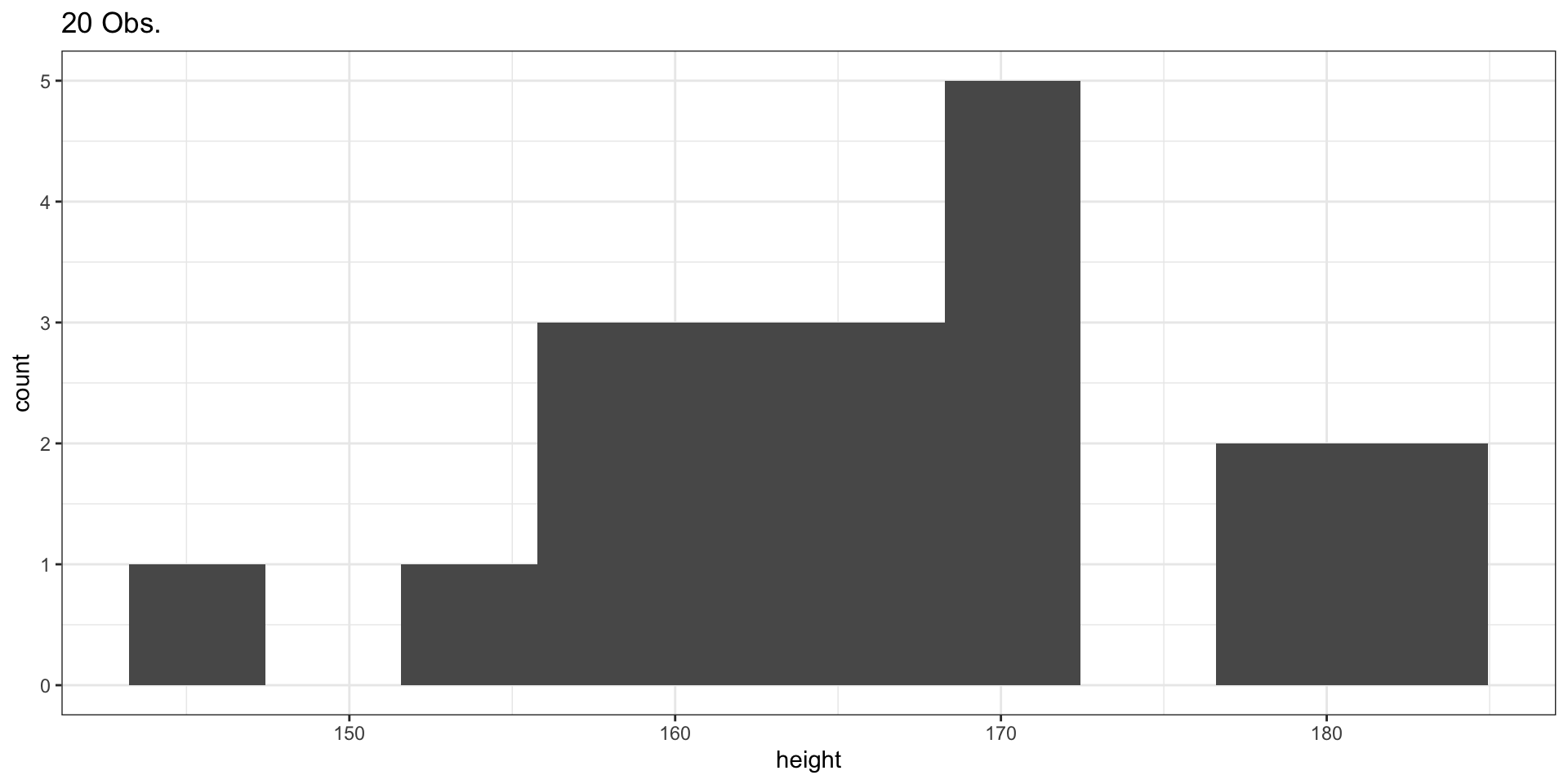
figure_1 <- ggplot(data = generated_heights_20obs, aes(x = height)) +
  geom_histogram(bins = 10) +
  theme_bw() +
  ggtitle("20 Obs.")
figure_1

Sample of 100 Observations

set.seed(123)
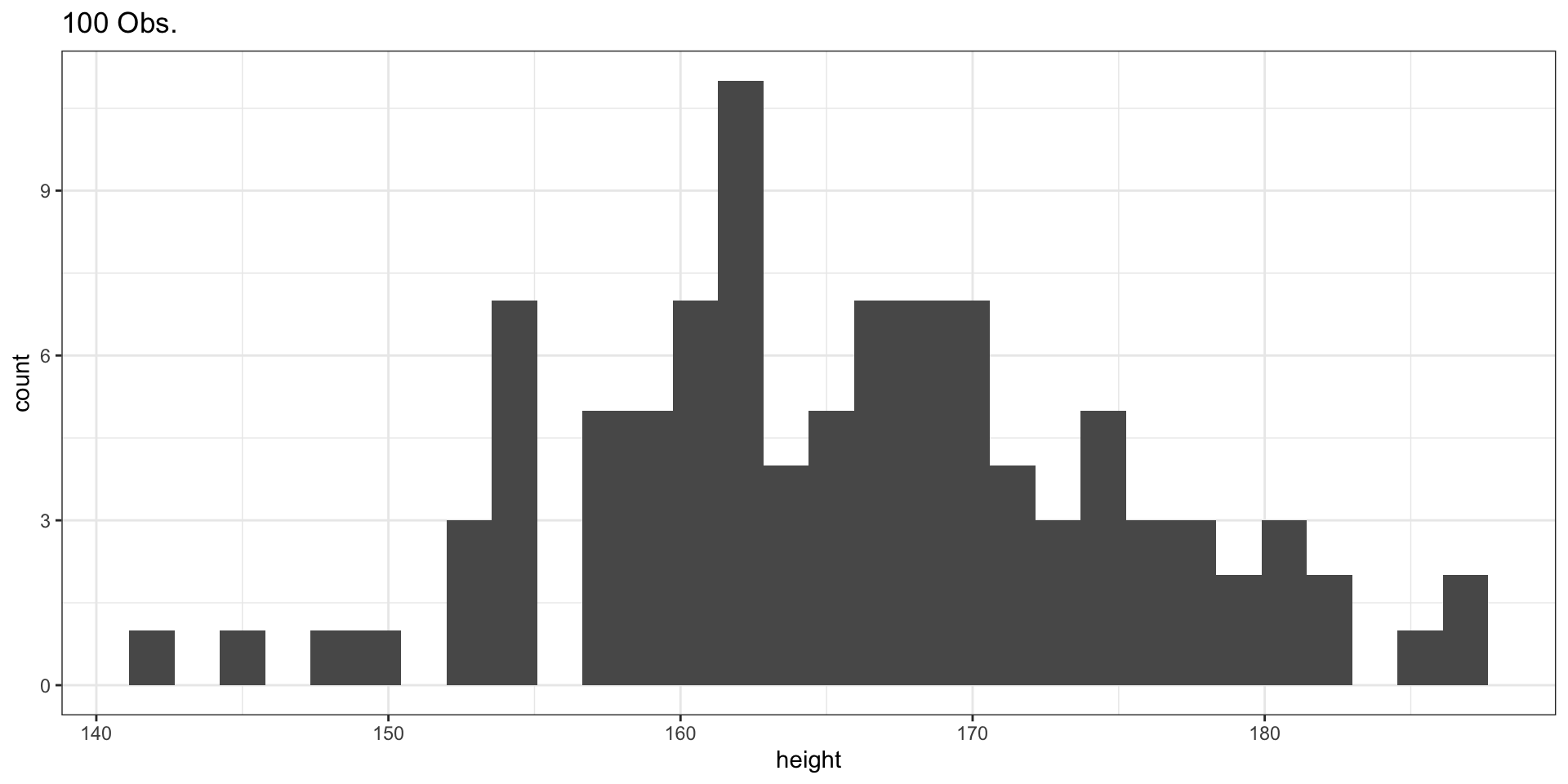
generated_heights_100obs <- rnorm(100, mean = 165, sd = 10)
generated_heights_100obs <- data.frame(height = generated_heights_100obs)
figure_2 <- ggplot(data = generated_heights_100obs, aes(x = height)) +
  geom_histogram() +
  theme_bw() +
  ggtitle("100 Obs.")
figure_2

Sample of 1000 Observations

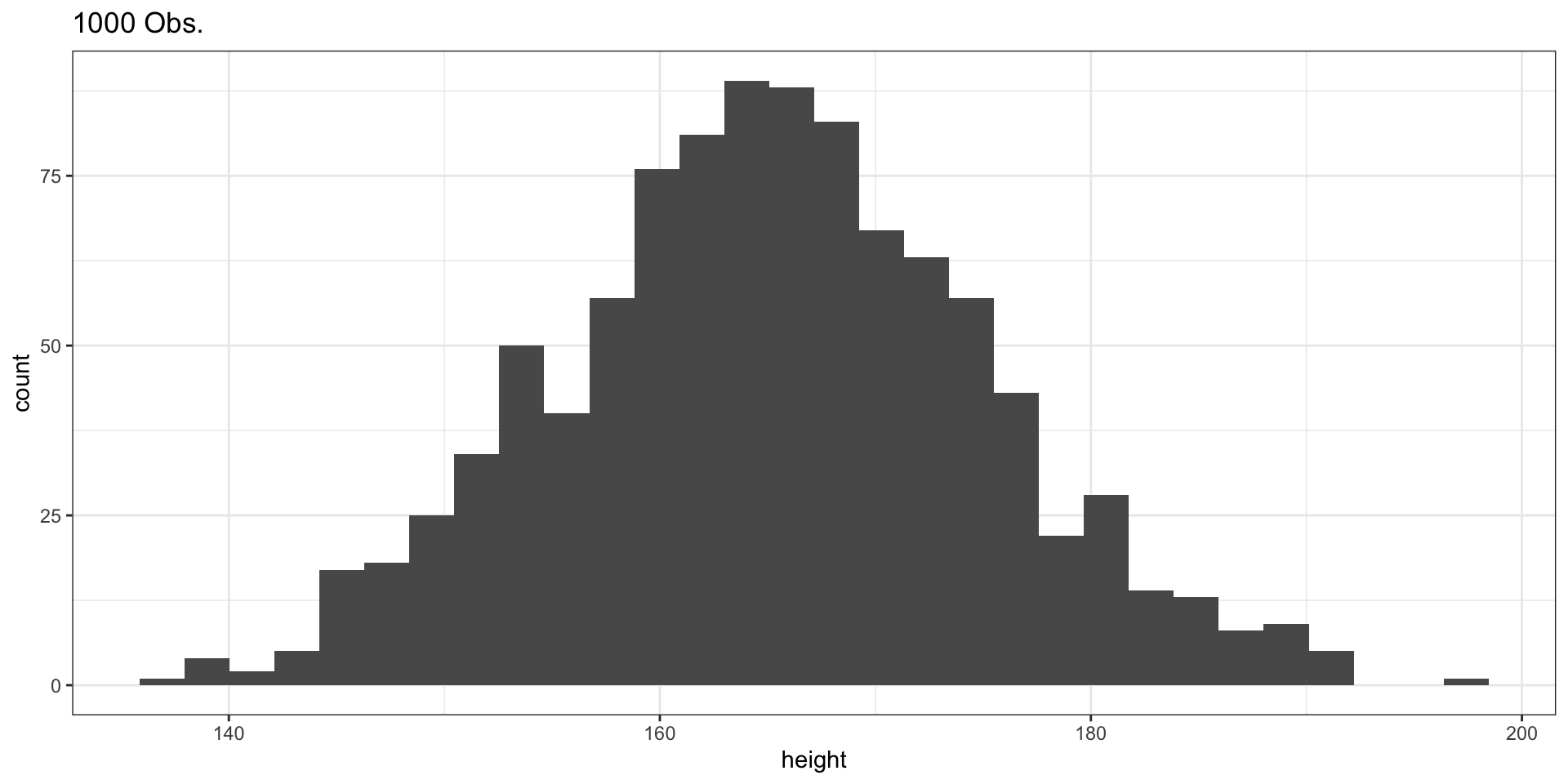
set.seed(123)
generated_heights_1000obs <- rnorm(1000, mean = 165, sd = 10)
generated_heights_1000obs <- data.frame(height = generated_heights_1000obs)
figure_3 <- ggplot(data = generated_heights_1000obs, aes(x = height)) +
  geom_histogram() +
  theme_bw() +
  ggtitle("1000 Obs.")
figure_3

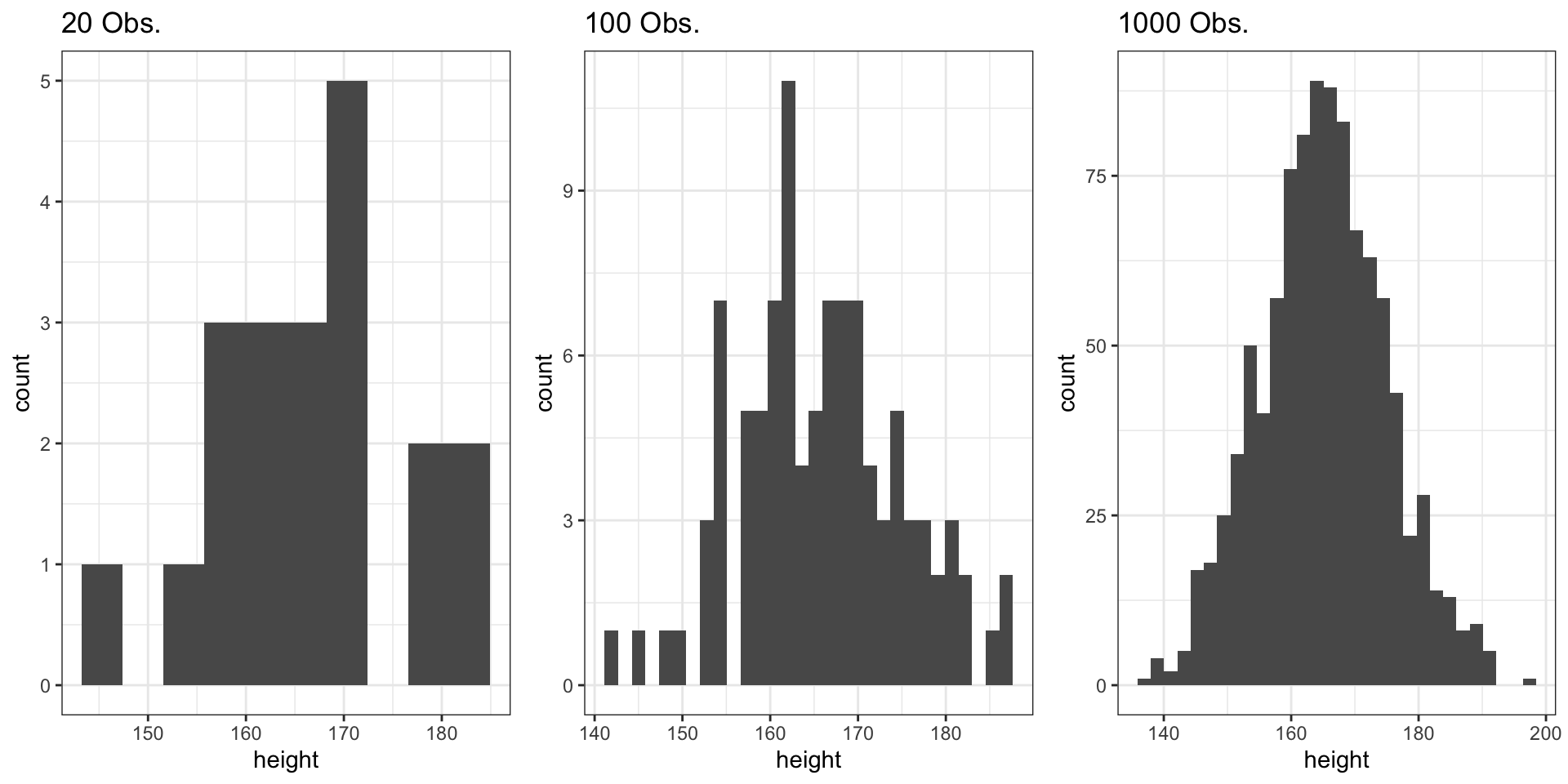
Comparing the Three Samples

grid.arrange(figure_1, figure_2, figure_3, ncol = 3)
  • Small samples (n = 20): More variability, less smooth
  • Large samples (n = 1000): Converges to theoretical normal distribution
  • Law of Large Numbers: As n increases, the sample distribution approximates the population distribution

pnorm: Cumulative Distribution Function

pnorm

What Does It Do?

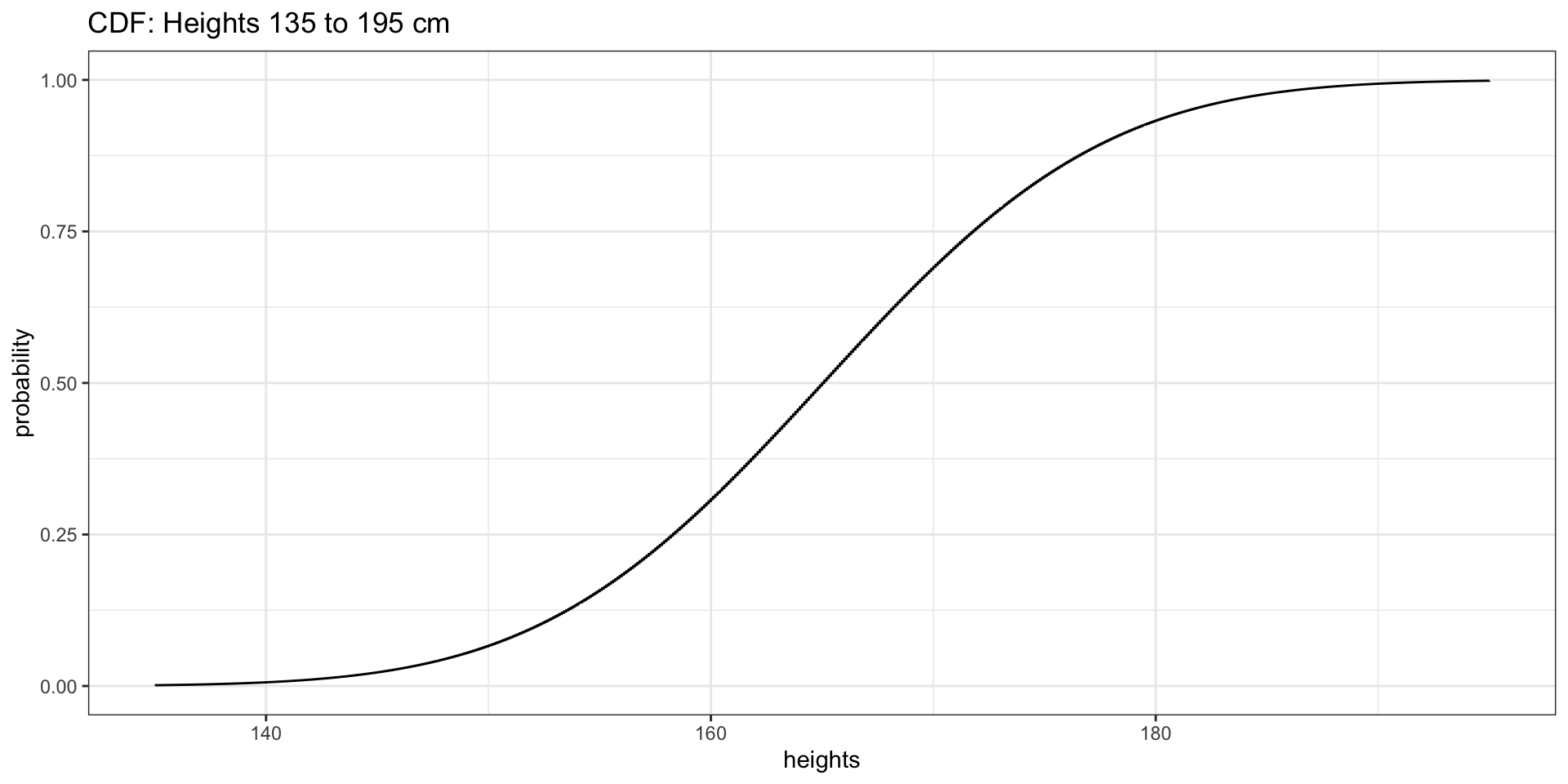
pnorm(x, mean, sd) returns the probability that a normally distributed variable \(X\) takes a value \(\leq x\):

\[F_X(x) = P(X \leq x)\]

We will use heights of women from 135 to 195 cm.

Heights of Women: CDF

Setting Up the Data
list_heights <- seq(135, 195, by = 0.1)
dummy_df <- pnorm(list_heights, mean = 165, sd = 10)
dummy_df2 <- data.frame(heights = list_heights, probability = dummy_df)
figure_4 <- ggplot(data = dummy_df2, aes(x = heights, y = probability)) +
  geom_step() +
  theme_bw() +
  ggtitle("CDF: Heights 135 to 195 cm")
figure_4

Highlighting Probabilities

P(Height \(\leq\) 150)
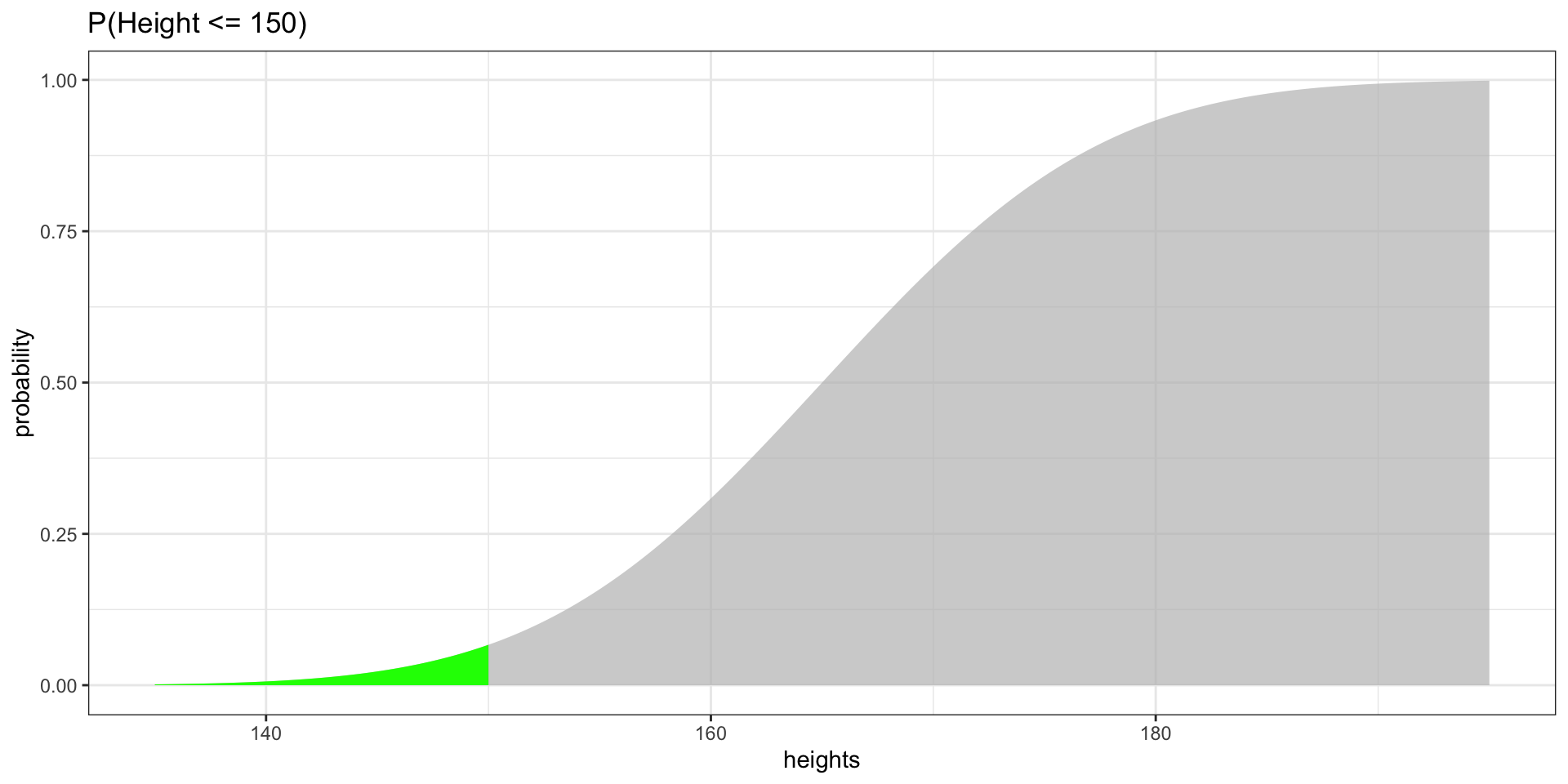
figure_5 <- ggplot(data = dummy_df2, aes(x = heights, y = probability)) +
  geom_area(fill = "green") +
  gghighlight(heights <= 150) +
  theme_bw() +
  ggtitle("P(Height <= 150)")
figure_5

Highlighting Probabilities

P(Height \(\leq\) 170)
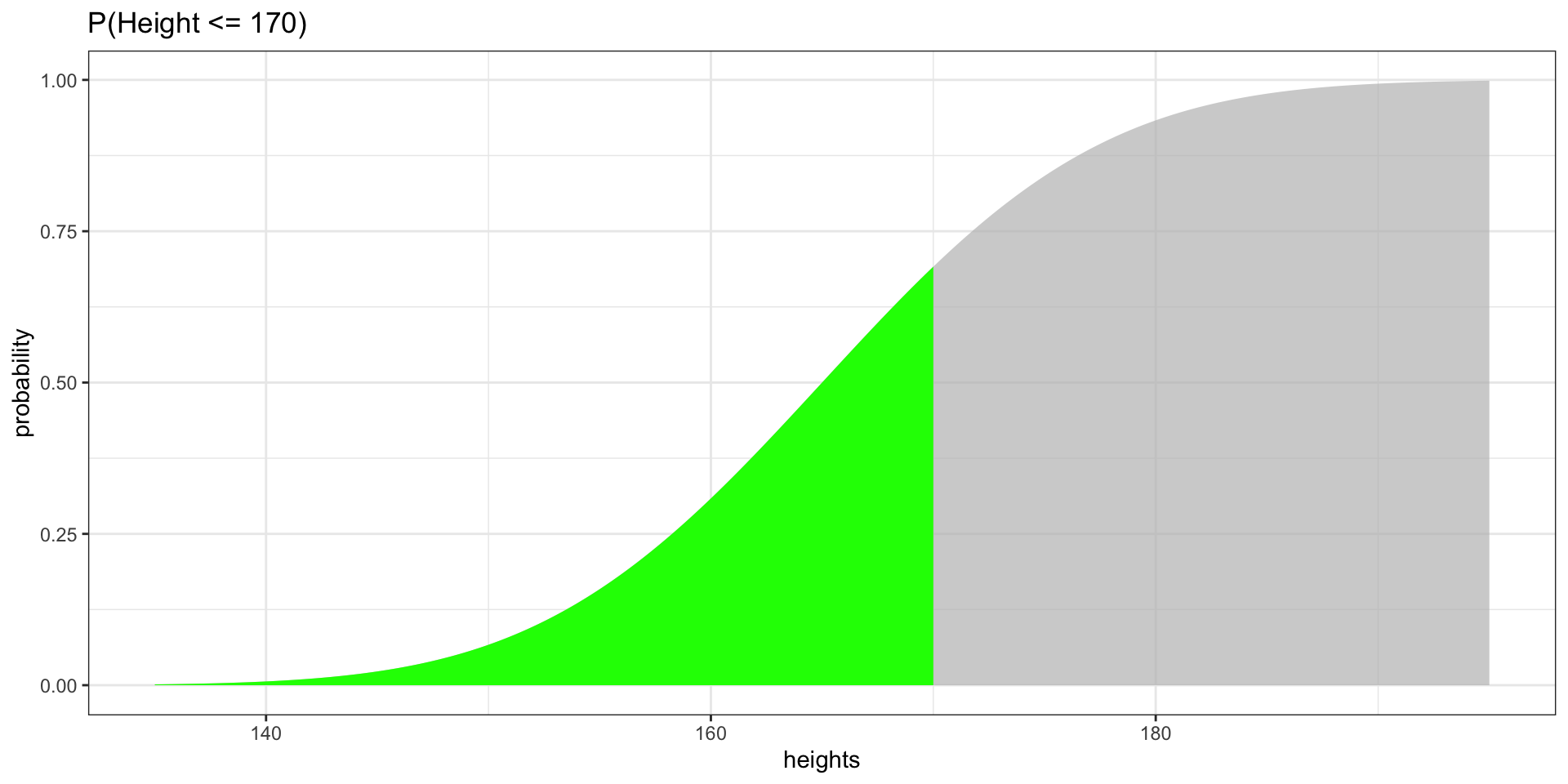
figure_6 <- ggplot(data = dummy_df2, aes(x = heights, y = probability)) +
  geom_area(fill = "green") +
  gghighlight(heights <= 170) +
  theme_bw() +
  ggtitle("P(Height <= 170)")
figure_6

Effect of Increment Size

How Granularity Affects the CDF Shape

Show Code
df_01 <- data.frame(heights = seq(135, 195, by = 0.1),
                    probability = pnorm(seq(135, 195, by = 0.1), 165, 10))
df_1 <- data.frame(heights = seq(135, 195, by = 1),
                   probability = pnorm(seq(135, 195, by = 1), 165, 10))
df_10 <- data.frame(heights = seq(135, 195, by = 10),
                    probability = pnorm(seq(135, 195, by = 10), 165, 10))
fig_inc1 <- ggplot(df_01, aes(x = heights, y = probability)) +
  geom_step() + theme_bw() + ggtitle("by = 0.1")
fig_inc2 <- ggplot(df_1, aes(x = heights, y = probability)) +
  geom_step() + theme_bw() + ggtitle("by = 1")
fig_inc3 <- ggplot(df_10, aes(x = heights, y = probability)) +
  geom_step() + theme_bw() + ggtitle("by = 10")
grid.arrange(fig_inc1, fig_inc2, fig_inc3, ncol = 3)
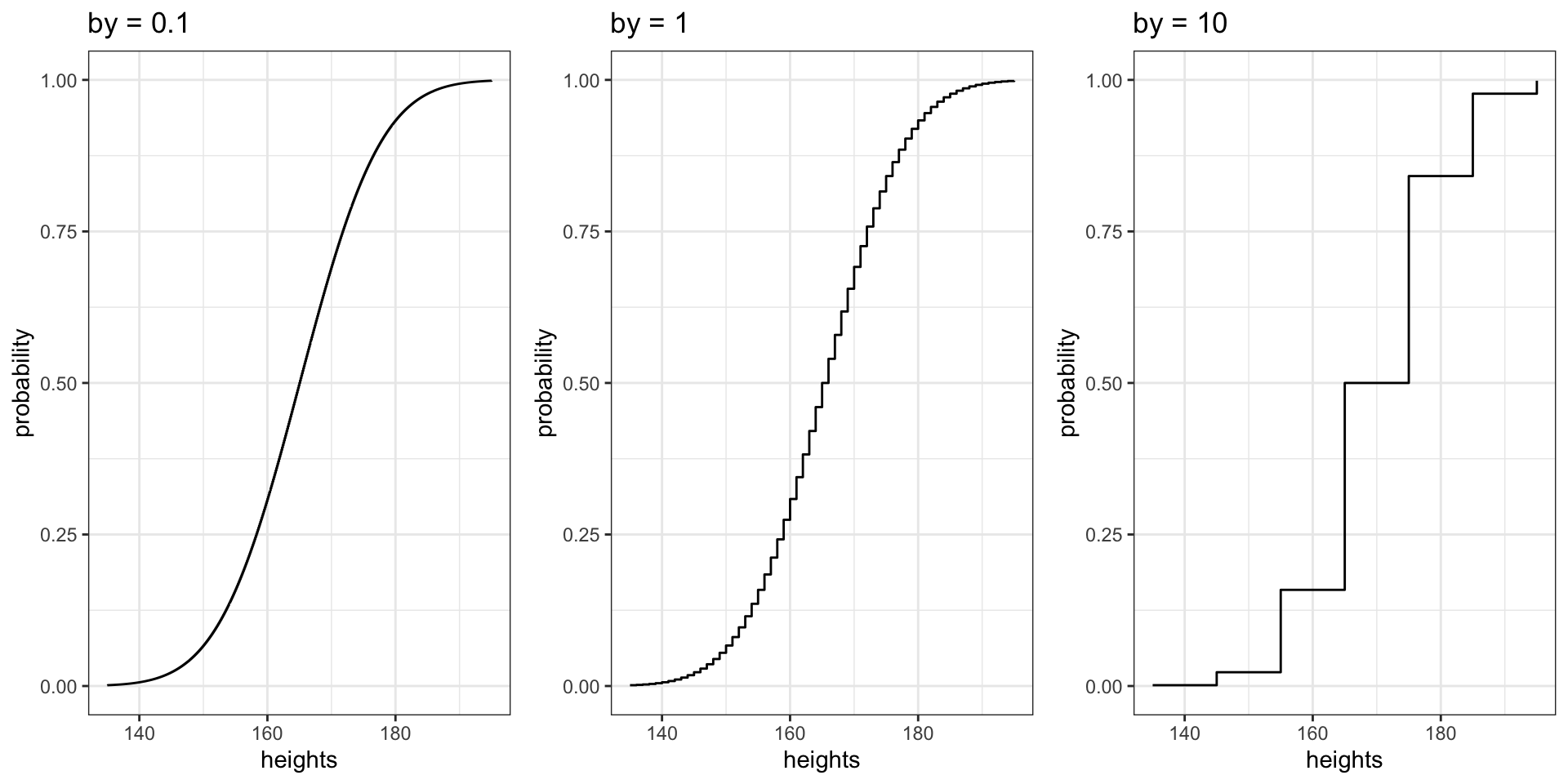
Smaller increments produce more data points, creating a smoother curve. With by = 10, the CDF is “jumpy.”

qnorm: Inverse CDF

qnorm

What Does It Do?

qnorm(p, mean, sd) returns the value \(x\) such that \(P(X \leq x) = p\).

It is the inverse of pnorm: given a probability, it returns the corresponding value.

Why is this useful? Whenever you need to find a cutoff value — “What height is at the 90th percentile?”, “What score do you need to be in the top 5%?” — you use qnorm.

qnorm in Action

Recovering Heights from Probabilities

Let us examine the CDF data we created previously:

head(df_1, n = 10)

qnorm in Action

Applying the Inverse

probability2 <- df_1$probability
dummy_df_q <- qnorm(probability2, mean = 165, sd = 10)
dummy_df_q2 <- data.frame(q = dummy_df_q, probability = probability2)
head(dummy_df_q2, n = 10)

The q column recovers the original heights — qnorm reverses what pnorm did.

dnorm: Probability Density Function

dnorm

What Does It Do?

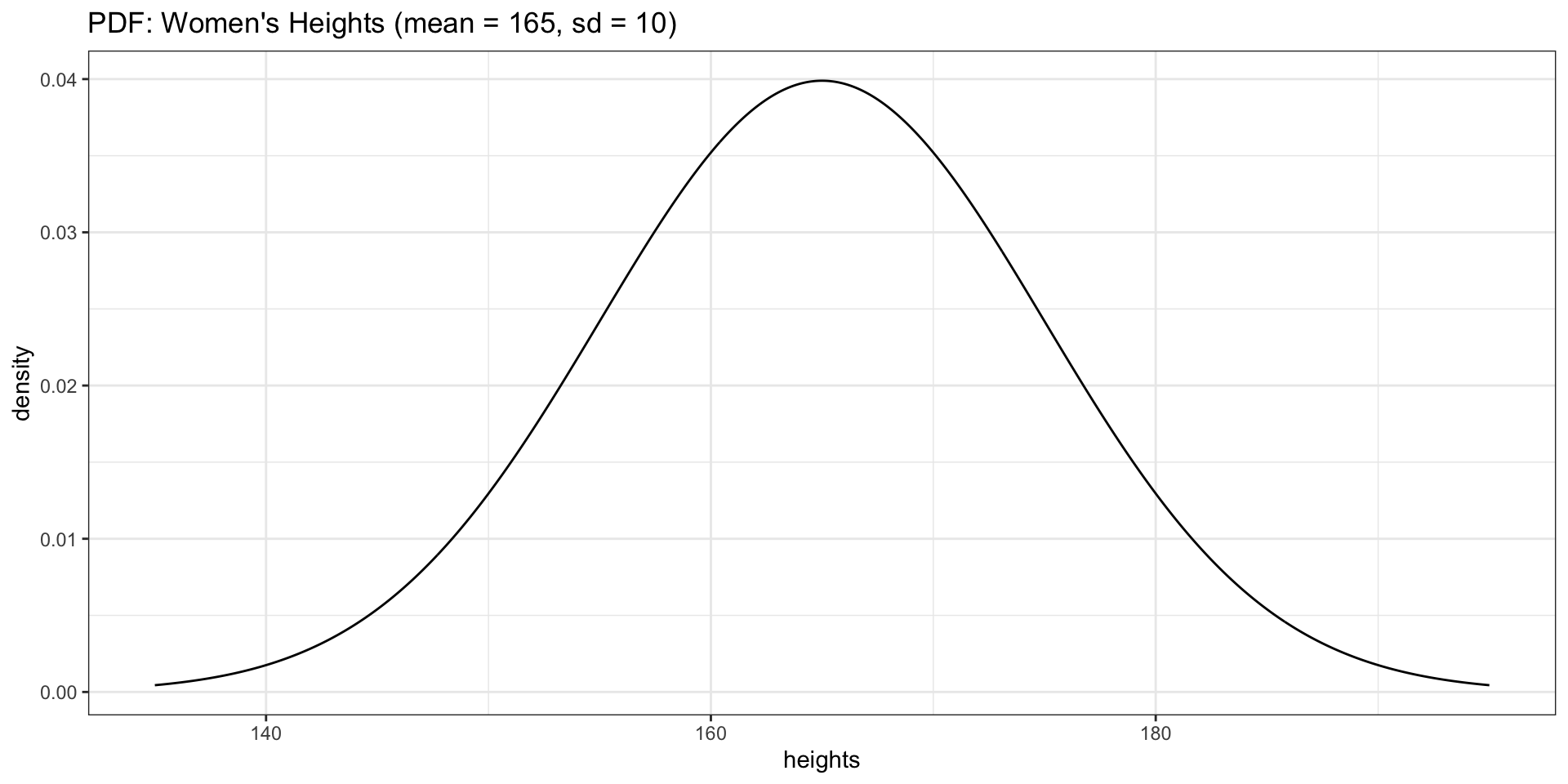
dnorm(x, mean, sd) returns the height of the bell curve at value \(x\).

This is the probability density — not a probability itself, but it tells you how concentrated observations are around a given value. Higher density = more likely to observe values nearby.

PDF for Heights

Show Code
list_heights <- seq(135, 195, by = 0.1)
dnorm_df2 <- data.frame(
  heights = list_heights,
  density = dnorm(list_heights, mean = 165, sd = 10)
)
ggplot(data = dnorm_df2, aes(x = heights, y = density)) +
  geom_line() +
  theme_bw() +
  ggtitle("PDF: Women's Heights (mean = 165, sd = 10)")

Overlaying the PDF on a Histogram

Connecting rnorm and dnorm

Show Code
ggplot(data = generated_heights_1000obs, aes(x = height)) +
  geom_histogram(aes(y = after_stat(density)), bins = 30, fill = "grey80", color = "white") +
  geom_line(data = dnorm_df2, aes(x = heights, y = density), color = "red", linewidth = 1) +
  theme_bw() +
  ggtitle("Histogram (1000 obs.) with Theoretical PDF Overlay")
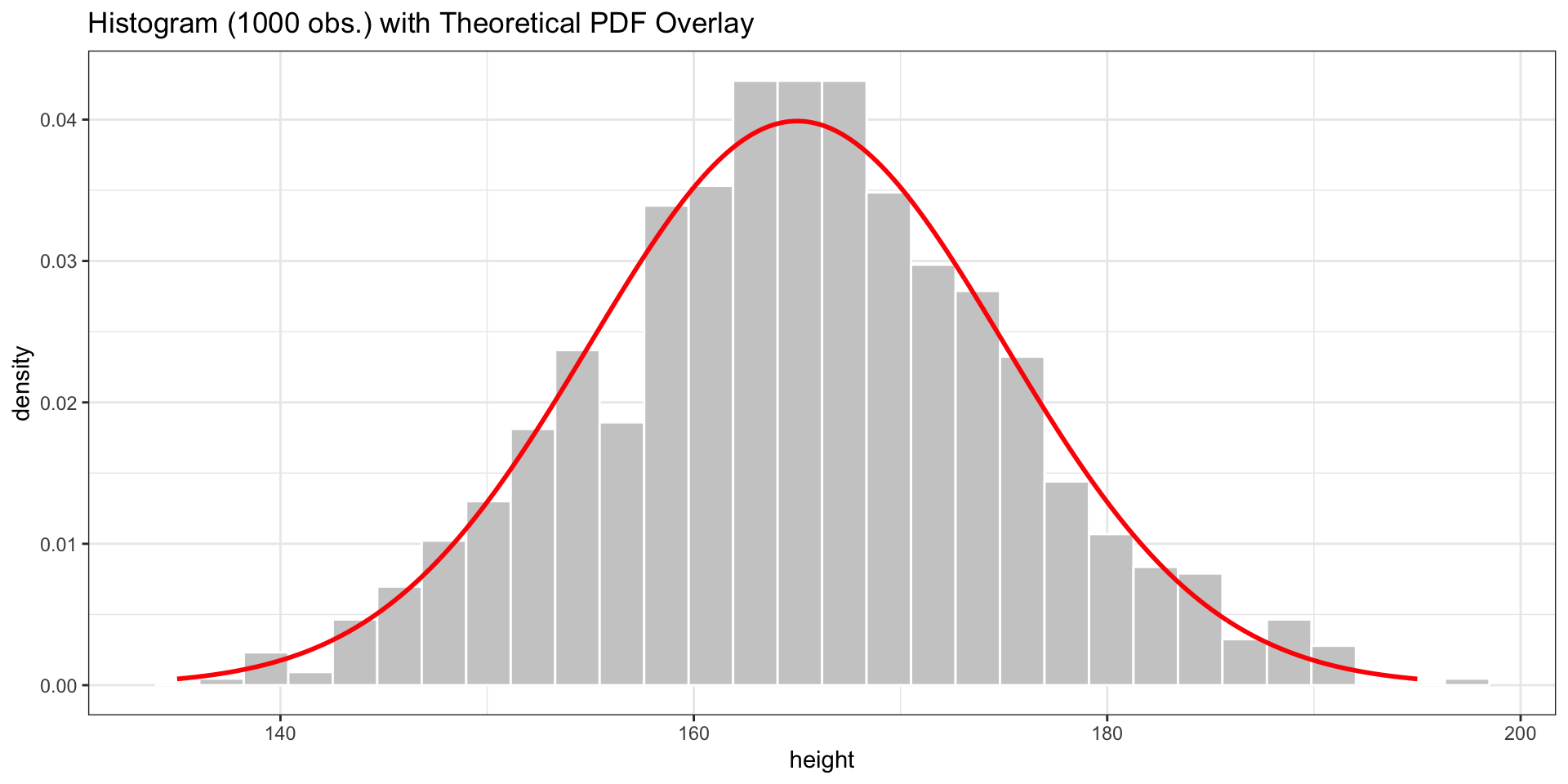
The red curve is the theoretical normal distribution. The histogram of our rnorm sample approximates it.

Normal vs. Non-Normal Distributions

Loading Life Expectancy Data

Working with Empirical Data

life_expectancy_df <- read.csv("./data/life-expectancy.csv")
life_expectancy_df2 <- life_expectancy_df %>%
  dplyr::group_by(Code, Entity) %>%
  dplyr::summarize(life_exp_mean = mean(Life.expectancy.at.birth..historical.))

Cleaning the Data

weird_labels <- c("OWID_KOS", "OWID_WRL", "")
clean_life_exp_mean_df <- subset(life_expectancy_df2, !(Code %in% weird_labels))
mean_empirical <- mean(clean_life_exp_mean_df$life_exp_mean, na.rm = TRUE)
sd_empirical <- sd(clean_life_exp_mean_df$life_exp_mean, na.rm = TRUE)

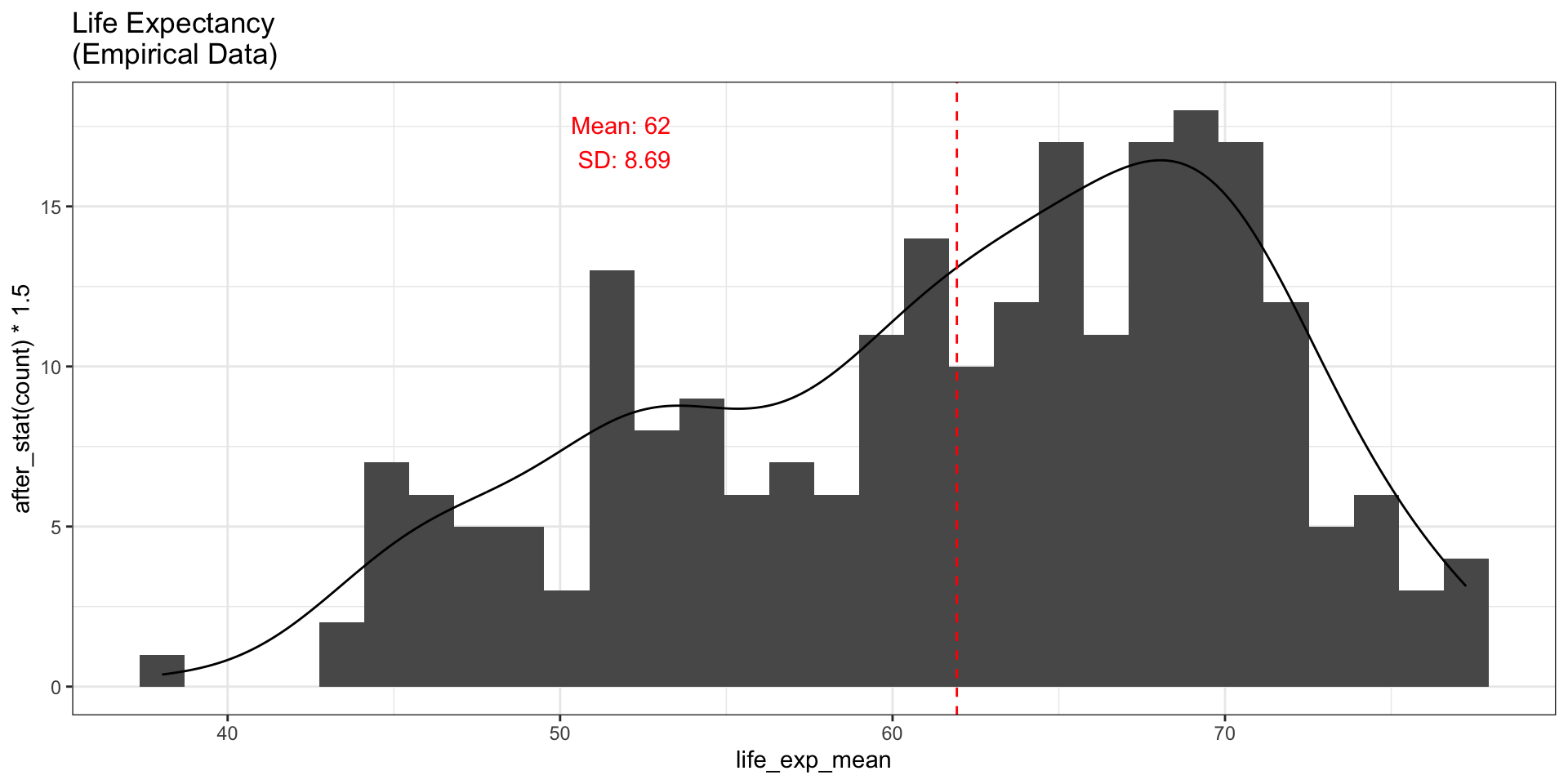
Mean: 61.93 years | SD: 8.69 years

Histogram of Empirical Data

Show Code
lines <- paste("Mean:", round(mean_empirical, 0),
               "\nSD:", round(sd_empirical, 2))

fig_hist1 <- ggplot(data = clean_life_exp_mean_df, aes(x = life_exp_mean)) +
  geom_histogram() +
  geom_density(aes(y = after_stat(count) * 1.5)) +
  theme_bw() +
  geom_vline(xintercept = mean_empirical, linetype = "dashed", col = "red") +
  ggtitle("Life Expectancy\n(Empirical Data)") +
  annotate("text", x = mean_empirical - 10, y = 17, label = lines, color = "red")
fig_hist1
Generating Normal Data

Same Mean & SD, 235 Observations

set.seed(123)
generated_data <- rnorm(235, mean = mean_empirical, sd = sd_empirical)
generated_data <- data.frame(life_exp_mean = generated_data)
fig_hist2 <- ggplot(data = generated_data, aes(x = life_exp_mean)) +
  geom_histogram() +
  geom_density(aes(y = after_stat(count) * 1.5)) +
  theme_bw() +
  geom_vline(xintercept = mean_empirical, linetype = "dashed", col = "red") +
  ggtitle("Life Expectancy\n(Generated Normal)") +
  annotate("text", x = mean_empirical - 12, y = 23, label = lines, color = "red") +
  ylab("count")

Comparing Empirical vs. Generated

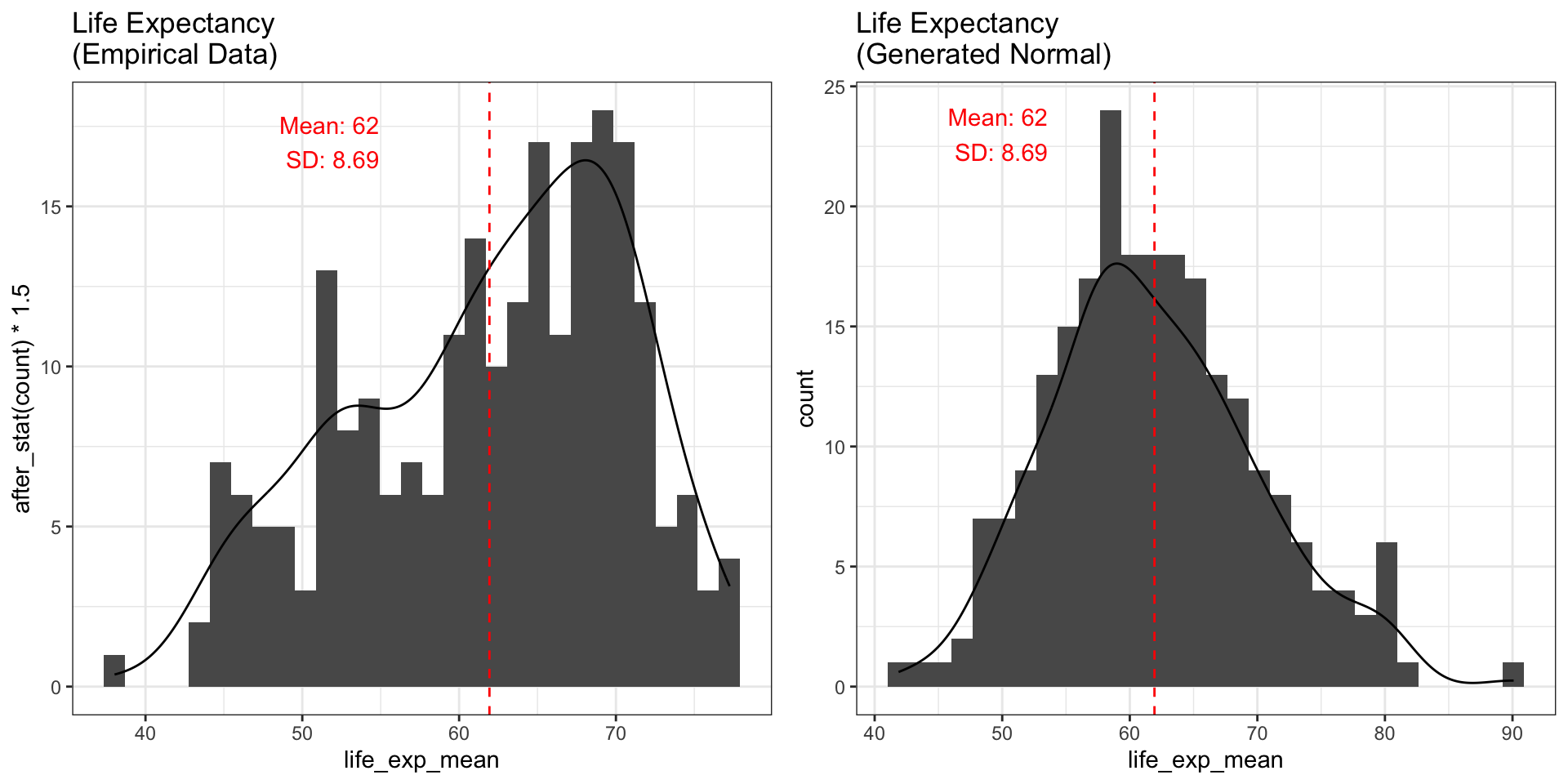
grid.arrange(fig_hist1, fig_hist2, ncol = 2)

The empirical data is not normally distributed — it is left-skewed.

Generating More Observations

1000 Observations

set.seed(123)
generated_data_1000obs <- rnorm(1000, mean = mean_empirical, sd = sd_empirical)
generated_data_1000obs <- data.frame(life_exp_mean = generated_data_1000obs)
Show Code
fig_hist3 <- ggplot(data = generated_data_1000obs, aes(x = life_exp_mean)) +
  geom_histogram() +
  geom_density(aes(y = after_stat(count) * 1.5)) +
  theme_bw() +
  geom_vline(xintercept = mean_empirical, linetype = "dashed", col = "red") +
  ggtitle("Generated Normal\n(1000 Obs.)") +
  annotate("text", x = mean_empirical - 10, y = 17, label = lines, color = "red")
fig_hist3
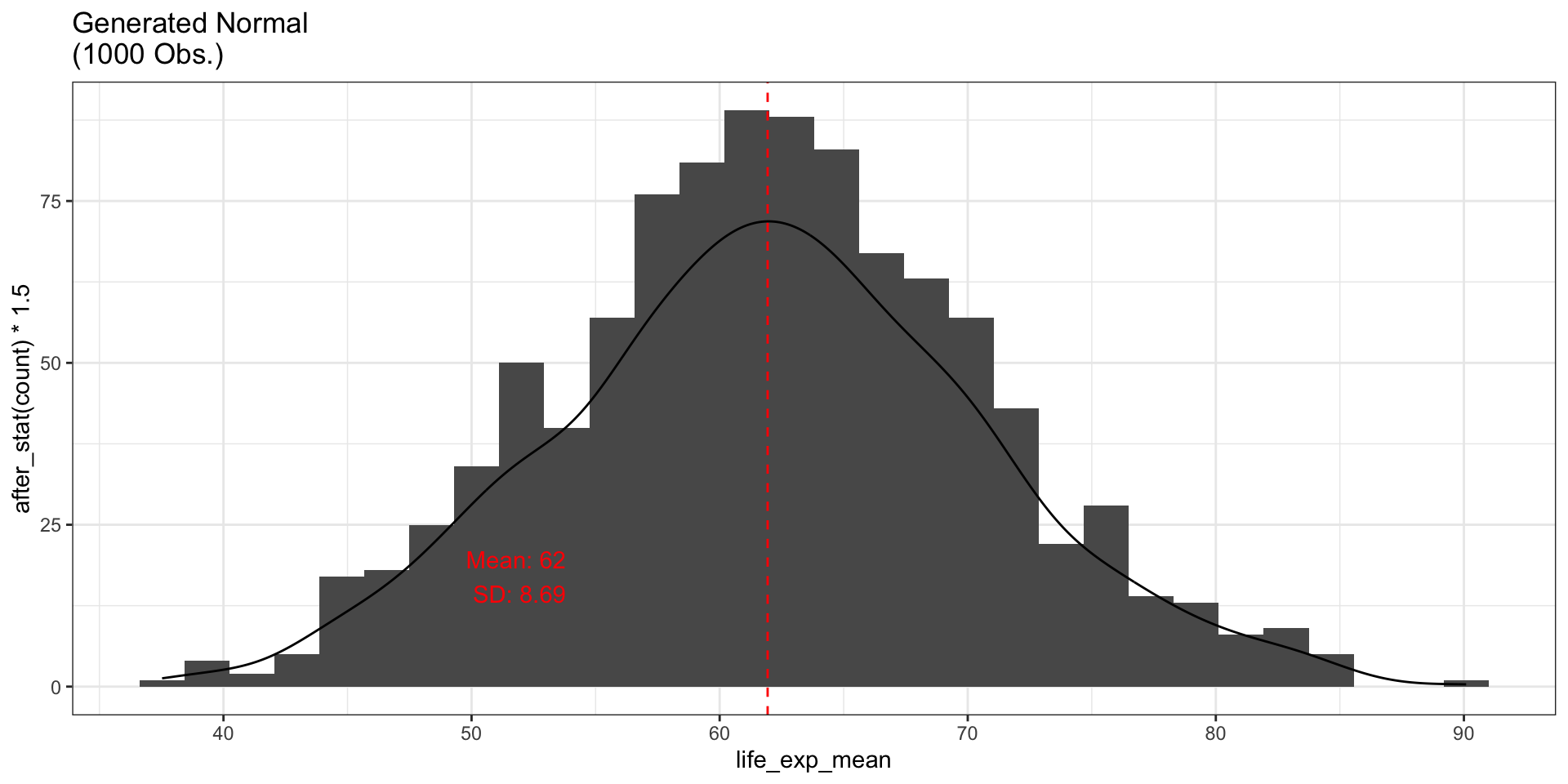
With more observations, the generated data looks increasingly like a bell curve.

Problems

Problem Setup

Let’s assume that life expectancy is normally distributed with:

  • Mean (\(\mu\)): 61.93 years
  • Standard deviation (\(\sigma\)): 8.69 years

Problem 1: Using pnorm

P(Life Expectancy \(\leq\) 50)

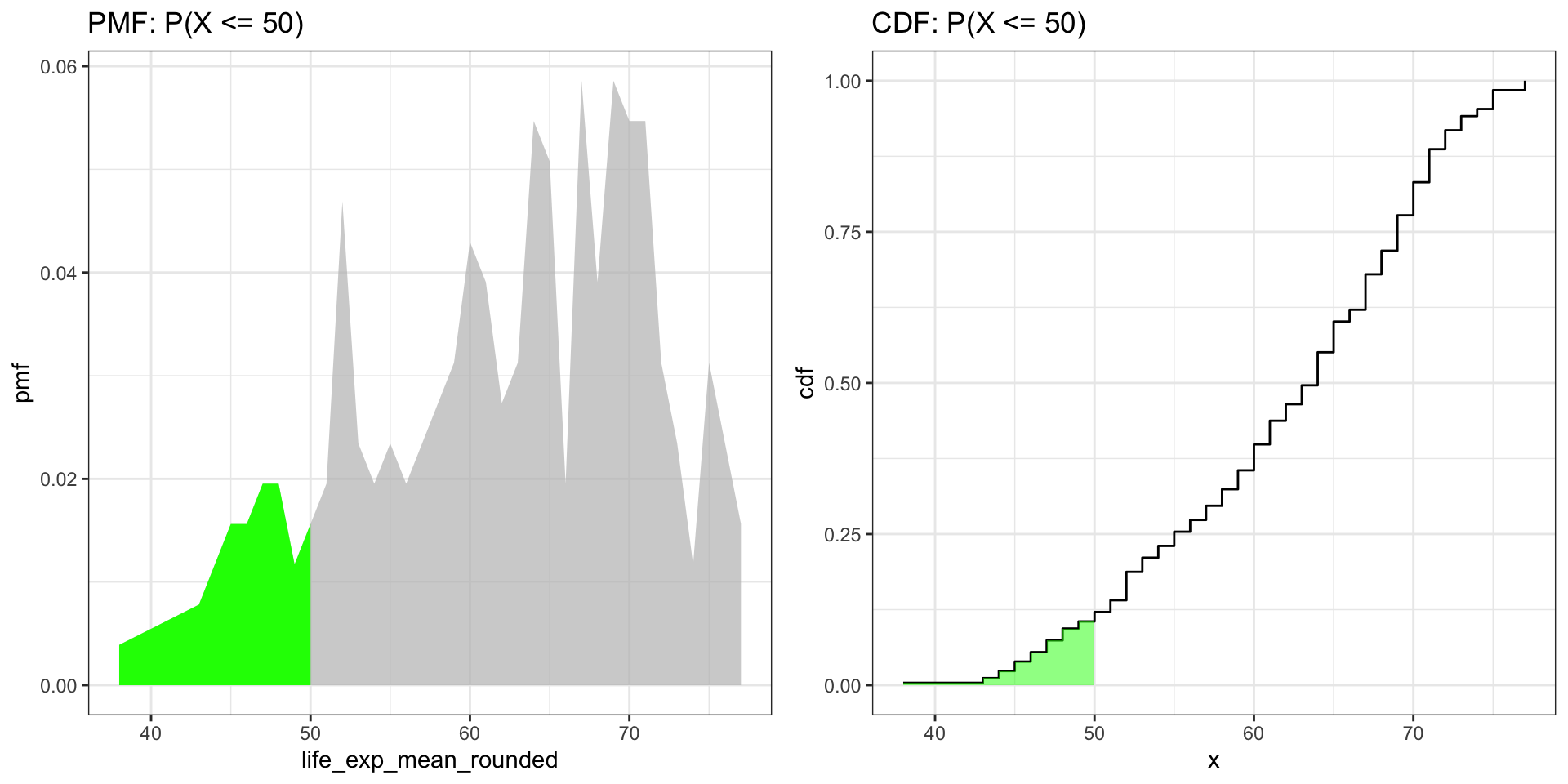
What is the probability that a randomly selected country has life expectancy \(\leq\) 50?

ctry_50 <- subset(life_expectancy_df2, life_exp_mean <= 50)
nrow(ctry_50) / nrow(life_expectancy_df2)
[1] 0.1171875

Problem 1 (cont.)

Using pnorm

If we assume a normal distribution, we can compute this directly:

res <- pnorm(50, mean = mean_empirical, sd = sd_empirical)
res
[1] 0.08475828

Problem 1 (cont.)

Visualizing with CDF

Show Code
new_data2 <- life_expectancy_df2
new_data2$life_exp_mean_rounded <- round(new_data2$life_exp_mean, 0)
freq_table <- table(new_data2$life_exp_mean_rounded)
freq_table <- data.frame(freq_table)
names(freq_table) <- c("life_exp_mean_rounded", "count")
freq_table$life_exp_mean_rounded <- as.numeric(as.character(freq_table$life_exp_mean_rounded))
freq_table$sum_frequency <- sum(freq_table$count)
freq_table$pmf <- freq_table$count / freq_table$sum_frequency
new_data2$cdf <- ecdf(new_data2$life_exp_mean_rounded)(new_data2$life_exp_mean_rounded)

# Deduplicated datasets for clean plots
cdf_unique <- new_data2 %>%
  distinct(life_exp_mean_rounded, .keep_all = TRUE) %>%
  arrange(life_exp_mean_rounded)
pmf_unique <- freq_table %>%
  select(life_exp_mean_rounded, pmf) %>%
  arrange(life_exp_mean_rounded)

# PMF with highlighted region
fig_pmf <- ggplot(data = pmf_unique, aes(x = life_exp_mean_rounded, y = pmf)) +
  geom_area(fill = "green") +
  gghighlight(life_exp_mean_rounded <= 50) +
  theme_bw() +
  ggtitle("PMF: P(X <= 50)")

# CDF with highlighted region using step-function rectangles
ecdf_fn <- ecdf(new_data2$life_exp_mean_rounded)
cdf_plot <- data.frame(x = sort(unique(new_data2$life_exp_mean_rounded)))
cdf_plot$cdf <- ecdf_fn(cdf_plot$x)
cdf_sub <- subset(cdf_plot, x <= 50)
cdf_rects <- data.frame(
  xmin = cdf_sub$x,
  xmax = c(cdf_sub$x[-1], 50),
  ymin = 0,
  ymax = cdf_sub$cdf
)
fig_cdf <- ggplot() +
  geom_step(data = cdf_plot, aes(x = x, y = cdf)) +
  geom_rect(data = cdf_rects,
            aes(xmin = xmin, xmax = xmax, ymin = ymin, ymax = ymax),
            fill = "green", alpha = 0.5) +
  theme_bw() +
  ggtitle("CDF: P(X <= 50)")

grid.arrange(fig_pmf, fig_cdf, ncol = 2)
Problem 2: Using pnorm (complement)

P(Life Expectancy > 70)

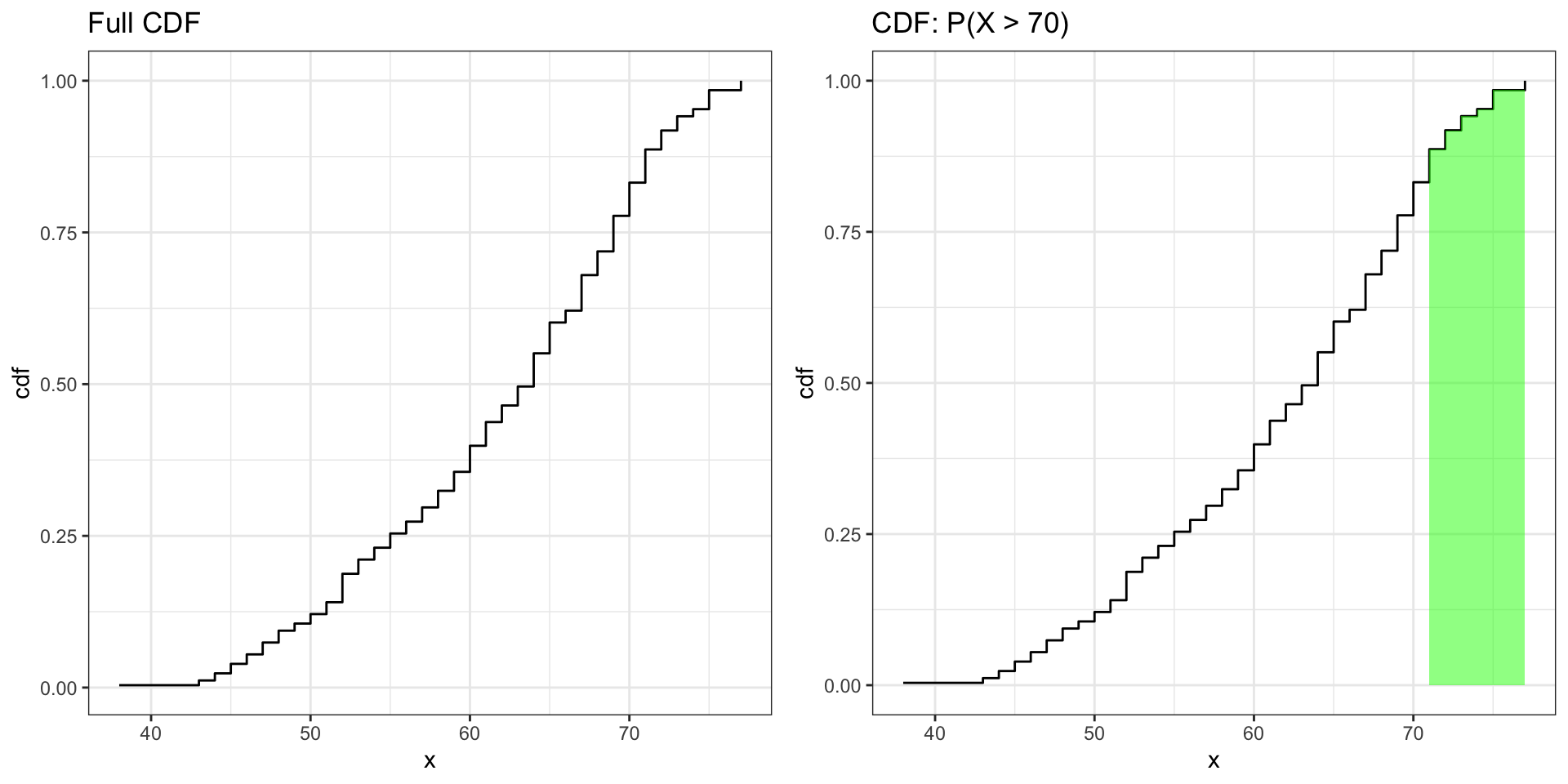
What is the probability that a randomly selected country has life expectancy > 70?

prob_more_70 <- subset(new_data2, life_exp_mean_rounded < 70)
1 - max(prob_more_70$cdf)
[1] 0.2226562

Problem 2 (cont.)

Using pnorm

If we assume a normal distribution:

res <- pnorm(70, mean = mean_empirical, sd = sd_empirical)
1 - res
[1] 0.1765817

Problem 2 (cont.)

Visualizing P(X > 70)

Show Code
fig_cdf_full <- ggplot(data = cdf_plot, aes(x = x, y = cdf)) +
  geom_step() +
  theme_bw() +
  ggtitle("Full CDF")

cdf_sub_70 <- subset(cdf_plot, x > 70)
cdf_rects_70 <- data.frame(
  xmin = cdf_sub_70$x,
  xmax = c(cdf_sub_70$x[-1], max(cdf_sub_70$x)),
  ymin = 0,
  ymax = cdf_sub_70$cdf
)
fig_cdf_70 <- ggplot() +
  geom_step(data = cdf_plot, aes(x = x, y = cdf)) +
  geom_rect(data = cdf_rects_70,
            aes(xmin = xmin, xmax = xmax, ymin = ymin, ymax = ymax),
            fill = "green", alpha = 0.5) +
  theme_bw() +
  ggtitle("CDF: P(X > 70)")

grid.arrange(fig_cdf_full, fig_cdf_70, ncol = 2)
Problem 3: Using dnorm

Where Is Life Expectancy Most Concentrated?

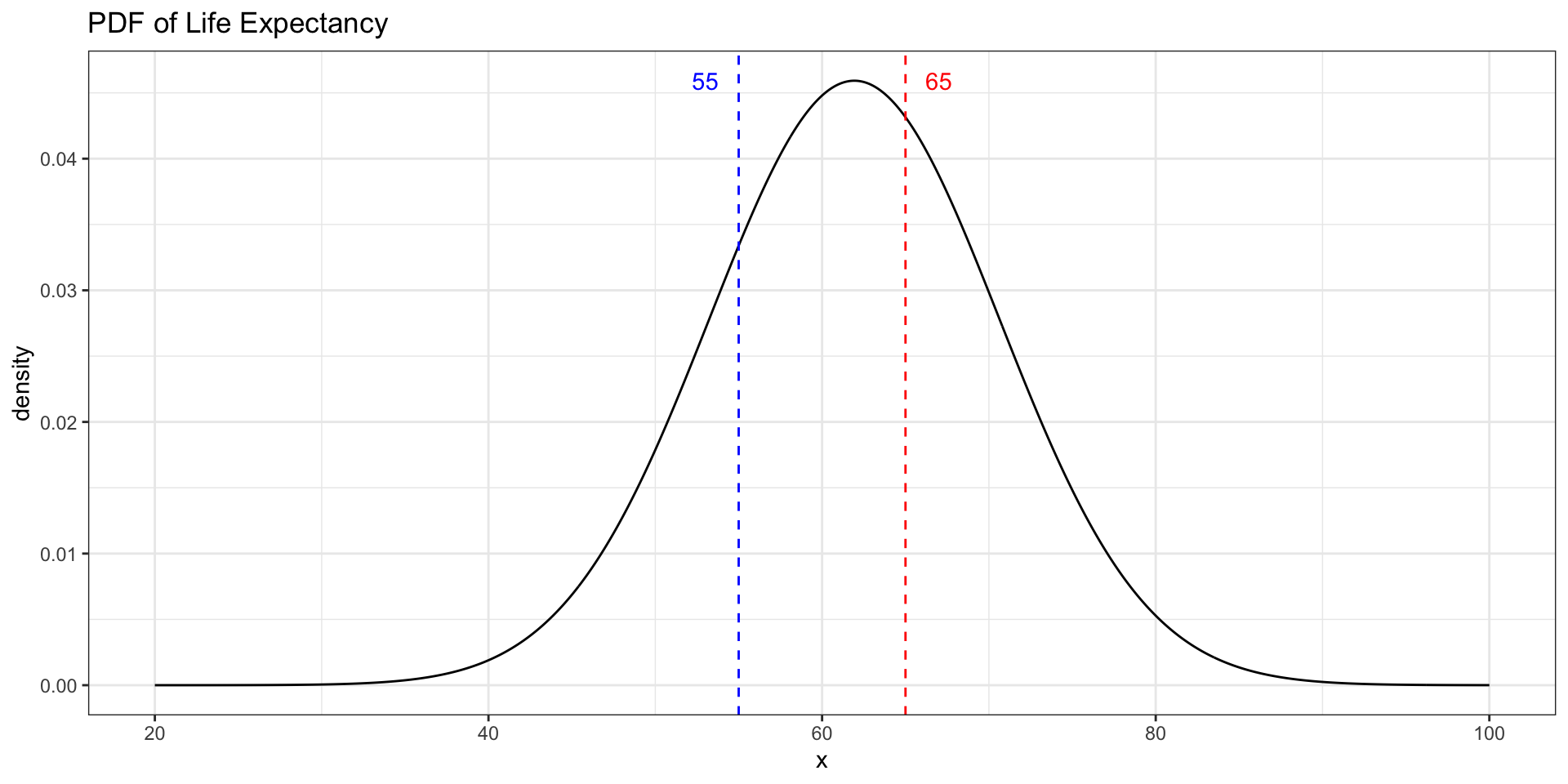
Which value has a higher density — a life expectancy of 55 or 65?

d_55 <- dnorm(55, mean = mean_empirical, sd = sd_empirical)
d_65 <- dnorm(65, mean = mean_empirical, sd = sd_empirical)
data.frame(life_exp = c(55, 65), density = c(d_55, d_65))

. . .
Problem 4: Using qnorm

90th Percentile of Life Expectancy

What life expectancy marks the top 10% of countries?

quantile(new_data2$life_exp_mean_rounded, c(0.90))
90% 
 72 

If we assume a normal distribution, we can use qnorm:

qnorm(0.9, mean = mean_empirical, sd = sd_empirical)
[1] 73.06729

Conclusion

  • The normal distribution can be fully described by its mean and standard deviation
  • pnorm and qnorm are inverses: probability \(\leftrightarrow\) value
  • dnorm tells you where observations are most concentrated — higher density near the mean, lower in the tails
  • Real-world data (life expectancy) is often skewed, but the normal approximation still gives useful answers