Statistical Analysis

Lab 11: RCT Data

Bogdan G. Popescu

John Cabot University

Intro

Setup

Open a new Quarto document and use this preamble:

---
title: "Lab 11"
author: "Your Name"
date: today
format:
  html:
    toc: true
    number-sections: true
    colorlinks: true
    smooth-scroll: true
    embed-resources: true
---

Render and save under “week11” in your “stats” folder.

Background

The Research Question

The World Bank is planning a program to reduce malaria risk in Malawi by providing insecticide-treated bed nets.

  • They ran a Randomized Controlled Trial (RCT) in three districts near Lake Malawi
  • 1000 individuals were randomly selected
  • Half received nets (treatment), half did not (control)
  • Question: does receiving a net reduce post-treatment malaria risk?

We want to estimate: \(E(\text{Post-Malaria Risk} \mid \text{Net})\)

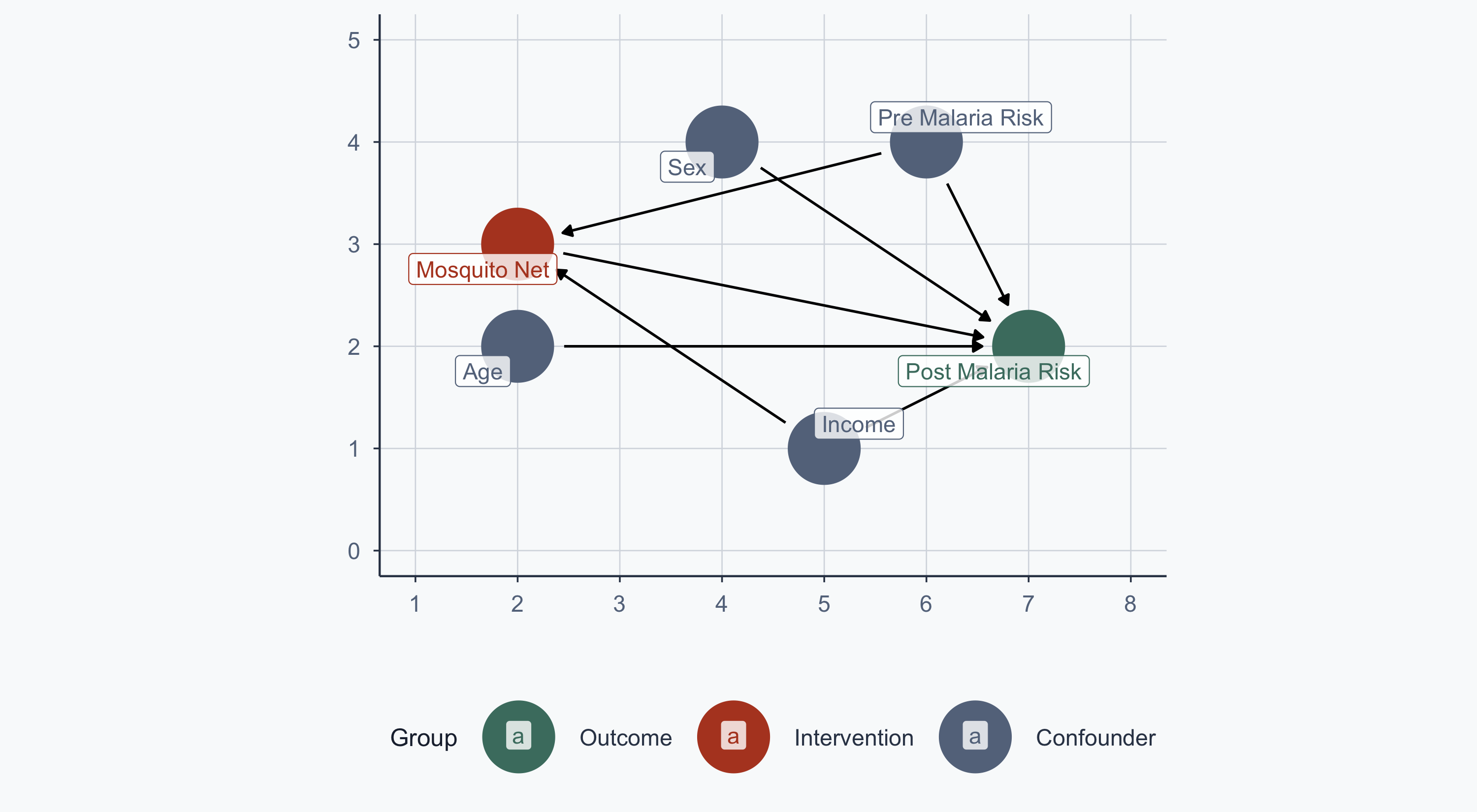
The Causal Model

Show code
malaria_dag <- dagify(
  post_malaria_risk ~ net + age + sex + income + pre_malaria_risk,
  net ~ income + pre_malaria_risk,
  exposure = "net",
  outcome = "post_malaria_risk",
  labels = c(
    post_malaria_risk = "Post Malaria Risk",
    net = "Mosquito Net",
    age = "Age",
    sex = "Sex",
    income = "Income",
    pre_malaria_risk = "Pre Malaria Risk"
  ),
  coords = list(
    x = c(net = 2, post_malaria_risk = 7, income = 5,
          age = 2, sex = 4, pre_malaria_risk = 6),
    y = c(net = 3, post_malaria_risk = 2, income = 1,
          age = 2, sex = 4, pre_malaria_risk = 4)
  )
)

bigger_dag <- data.frame(tidy_dagitty(malaria_dag))
bigger_dag$type <- "Confounder"
bigger_dag$type[bigger_dag$name == "post_malaria_risk"] <- "Outcome"
bigger_dag$type[bigger_dag$name == "net"] <- "Intervention"

min_x <- min(bigger_dag$x)
max_x <- max(bigger_dag$x)
min_y <- min(bigger_dag$y)
max_y <- max(bigger_dag$y)

col <- c("Outcome" = sage, "Intervention" = terracotta, "Confounder" = stone)
order_col <- c("Outcome", "Intervention", "Confounder")

ggplot(bigger_dag, aes(x = x, y = y, xend = xend, yend = yend, color = type)) +
  geom_dag_point() +
  geom_dag_edges() +
  coord_sf(xlim = c(min_x - 1, max_x + 1), ylim = c(min_y - 1, max_y + 1)) +
  scale_colour_manual(values = col, name = "Group", breaks = order_col) +
  geom_label_repel(
    data = subset(bigger_dag, !duplicated(bigger_dag$label)),
    aes(label = label), fill = alpha("white", 0.8)
  ) +
  labs(x = "", y = "") +
  theme_meridian()
Why Randomization Matters

In the first DAG, notice the arrows going into the net node — income and pre-malaria risk determine who gets a net. This is the selection problem: without randomization, people who choose nets may differ systematically from those who don’t.

If wealthier people are more likely to buy nets and have lower malaria risk for other reasons, we can’t tell whether it’s the net or the wealth that reduces malaria. The treatment effect is confounded.

Randomization solves this by making treatment independent of all confounders — observed and unobserved. A coin flip doesn’t care about your income or health.

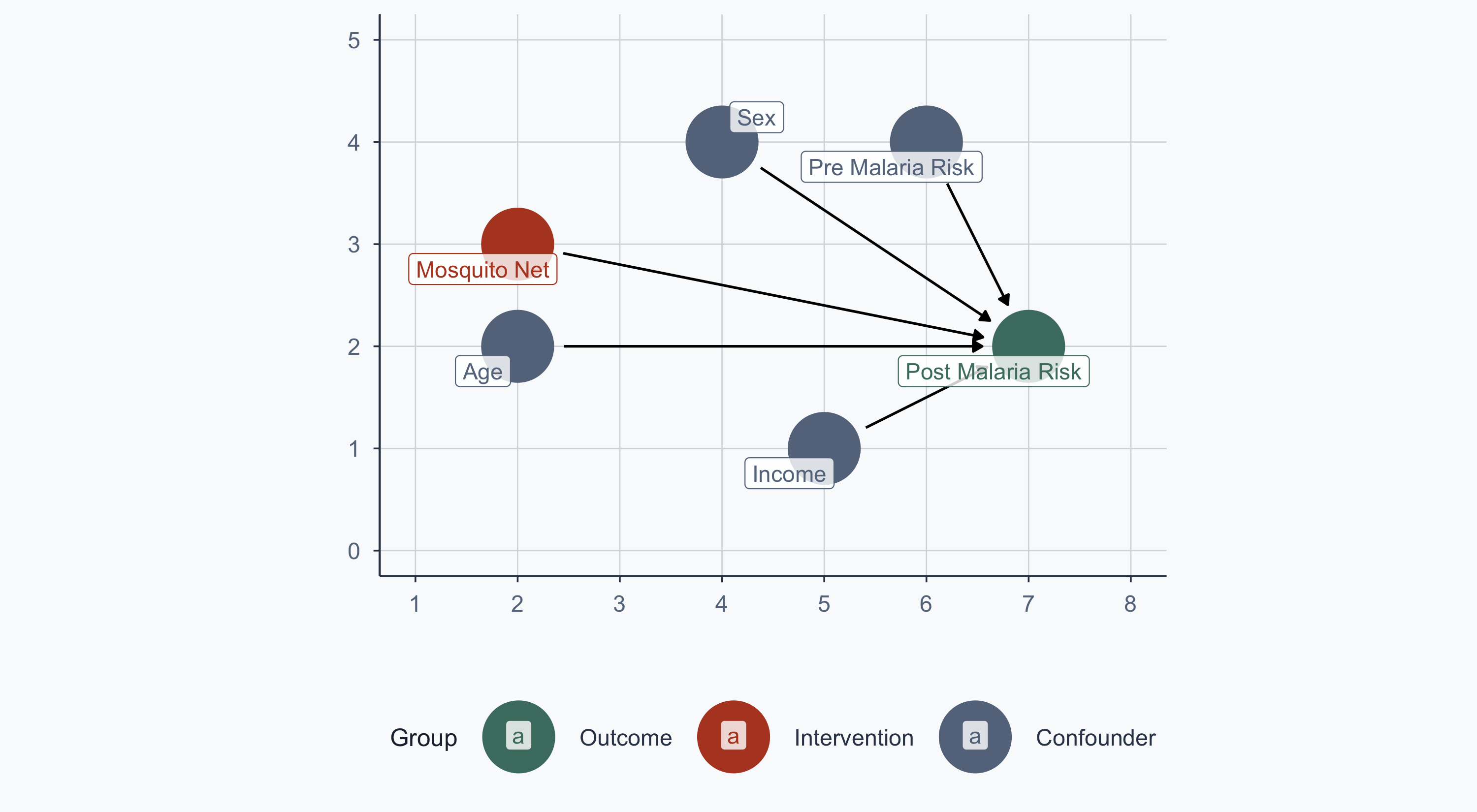
After Randomization

Because nets are randomly assigned, we can delete all arrows going into the net node. This is not a modelling choice — it follows directly from the experimental design. No confounder can predict treatment assignment, so no “back-door” path exists.

Show code
malaria_dag2 <- dagify(
  post_malaria_risk ~ net + age + sex + income + pre_malaria_risk,
  exposure = "net",
  outcome = "post_malaria_risk",
  labels = c(
    post_malaria_risk = "Post Malaria Risk",
    net = "Mosquito Net",
    age = "Age",
    sex = "Sex",
    income = "Income",
    pre_malaria_risk = "Pre Malaria Risk"
  ),
  coords = list(
    x = c(net = 2, post_malaria_risk = 7, income = 5,
          age = 2, sex = 4, pre_malaria_risk = 6),
    y = c(net = 3, post_malaria_risk = 2, income = 1,
          age = 2, sex = 4, pre_malaria_risk = 4)
  )
)

bigger_dag2 <- data.frame(tidy_dagitty(malaria_dag2))
bigger_dag2$type <- "Confounder"
bigger_dag2$type[bigger_dag2$name == "post_malaria_risk"] <- "Outcome"
bigger_dag2$type[bigger_dag2$name == "net"] <- "Intervention"

ggplot(bigger_dag2, aes(x = x, y = y, xend = xend, yend = yend, color = type)) +
  geom_dag_point() +
  geom_dag_edges() +
  coord_sf(xlim = c(min_x - 1, max_x + 1), ylim = c(min_y - 1, max_y + 1)) +
  scale_colour_manual(values = col, name = "Group", breaks = order_col) +
  geom_label_repel(
    data = subset(bigger_dag2, !duplicated(bigger_dag2$label)),
    aes(label = label), fill = alpha("white", 0.8)
  ) +
  labs(x = "", y = "") +
  theme_meridian()

Loading the Data

The RCT Dataset

rct_data <- read.csv(file = './data/rct_data_geo_malawi.csv')
glimpse(rct_data, n = 10)
Rows: 1,000
Columns: 10
$ id                <int> 1, 2, 3, 4, 5, 6, 7, 8, 9, 10, 11, 12, 13, 14, 15, 1…
$ lat               <dbl> -11.27476, -11.15300, -11.13967, -11.25544, -11.1777…
$ lon               <dbl> 34.03006, 34.14594, 34.14297, 34.14619, 34.20031, 34…
$ income            <dbl> 409.4701, 520.8072, 581.3331, 324.0727, 532.1844, 53…
$ age               <int> 10, 35, 7, 43, 45, 51, 24, 17, 38, 69, 10, 21, 32, 3…
$ sex               <chr> "Man", "Woman", "Woman", "Woman", "Man", "Woman", "M…
$ health            <dbl> 82.78928, 81.18602, 80.57399, 82.84023, 87.40737, 57…
$ net               <int> 0, 1, 0, 0, 1, 1, 1, 0, 1, 1, 1, 1, 1, 1, 0, 0, 0, 1…
$ malaria_risk_pre  <dbl> 35.74454, 36.65260, 22.87415, 35.41934, 27.49873, 42…
$ malaria_risk_post <dbl> 42.52199, 34.27589, 32.67552, 43.87256, 27.16945, 41…

Download link: Intervention Data

Summary Statistics

datasummary_skim(rct_data)
Unique Missing Pct. Mean SD Min Median Max Histogram
id 1000 0 500.5 288.8 1.0 500.5 1000.0
lat 1000 0 -11.2 0.1 -11.3 -11.2 -11.1
lon 1000 0 34.1 0.1 34.0 34.1 34.2
income 1000 0 498.0 74.8 245.3 497.0 739.7
age 76 0 28.9 16.1 1.0 27.0 89.0
health 1000 0 69.1 12.9 30.9 69.0 100.0
net 2 0 0.5 0.5 0.0 1.0 1.0
malaria_risk_pre 1000 0 38.0 9.8 5.0 37.9 70.0
malaria_risk_post 1000 0 40.4 10.4 5.0 40.5 70.0
sex N %
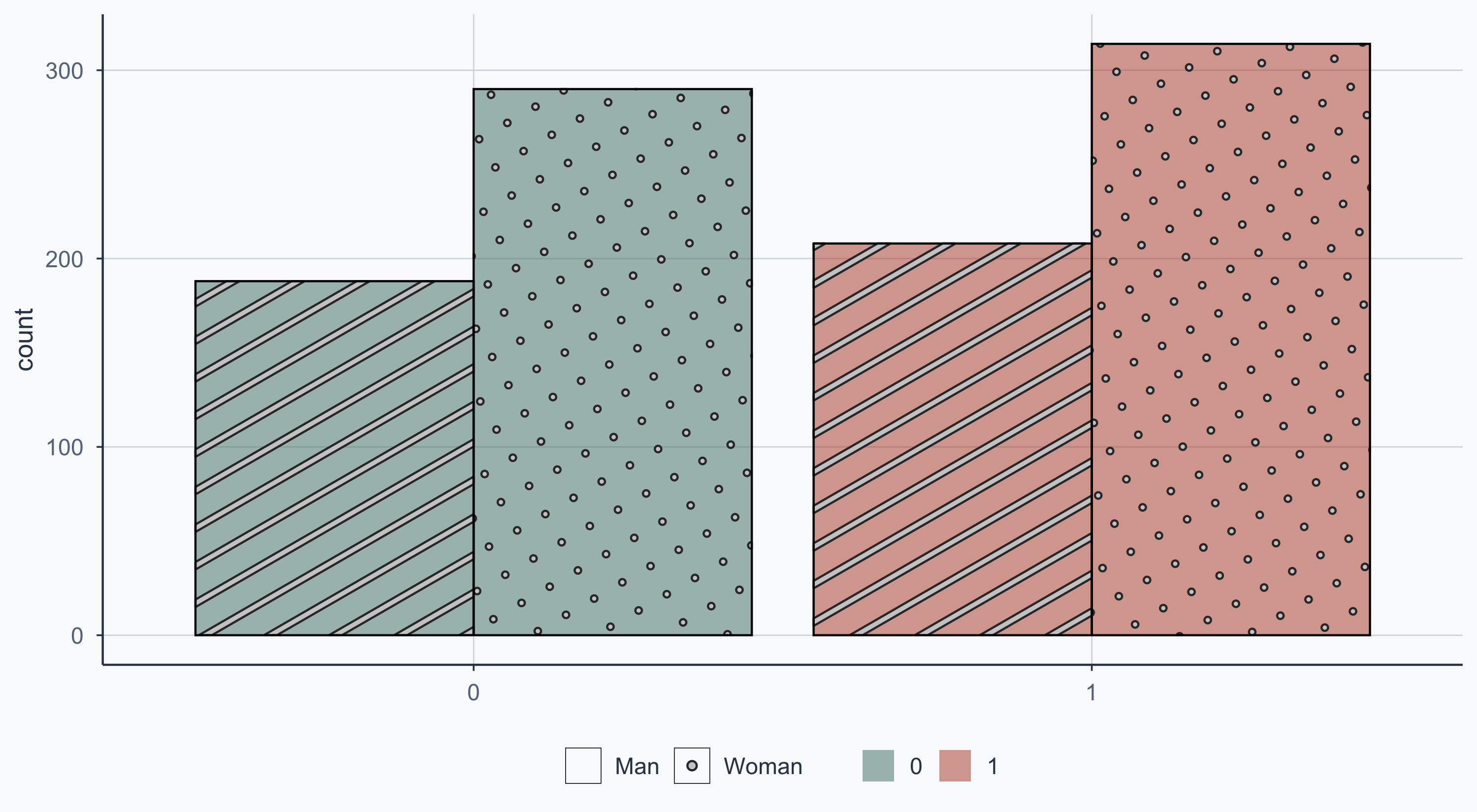
Man 396 39.6
Woman 604 60.4

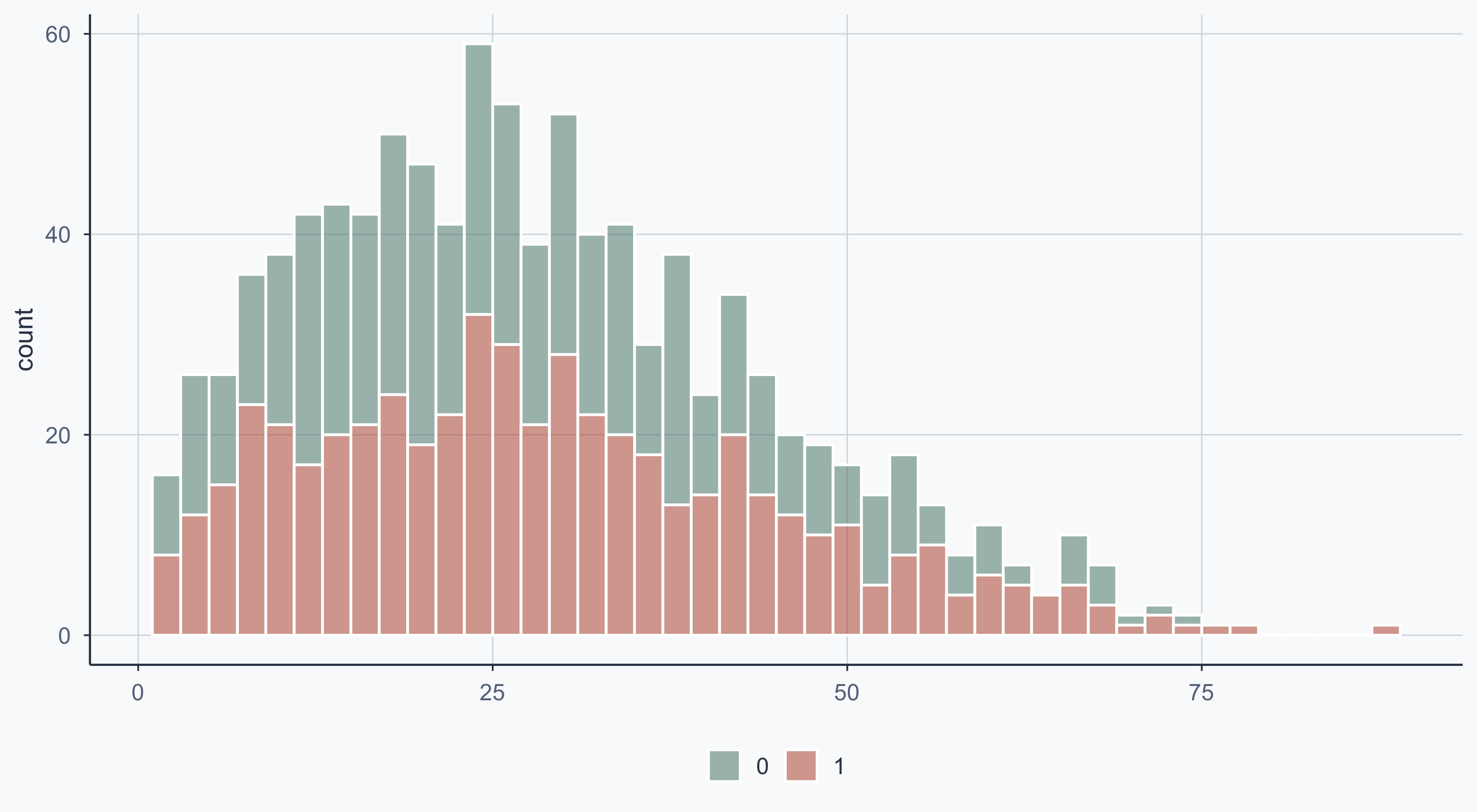
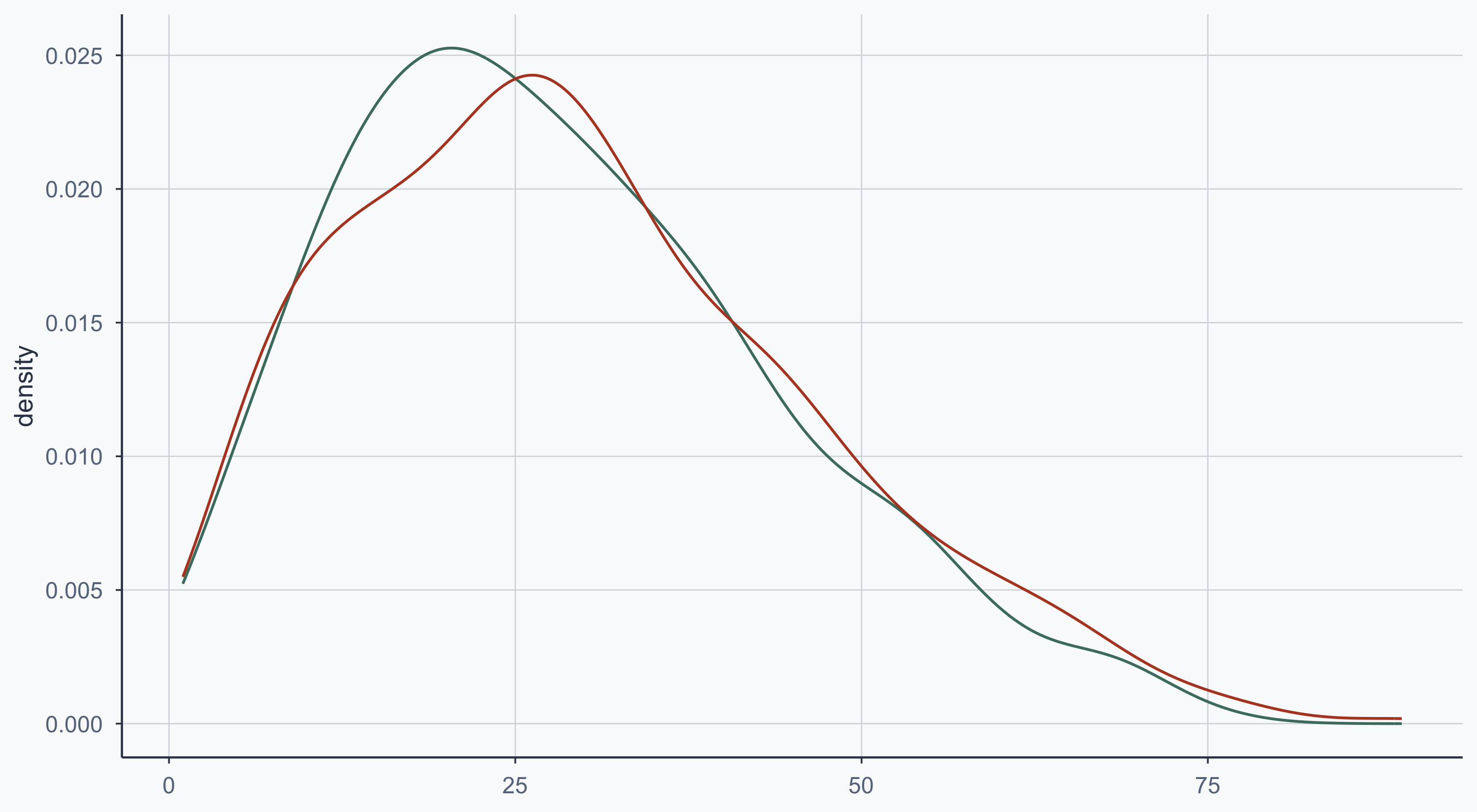
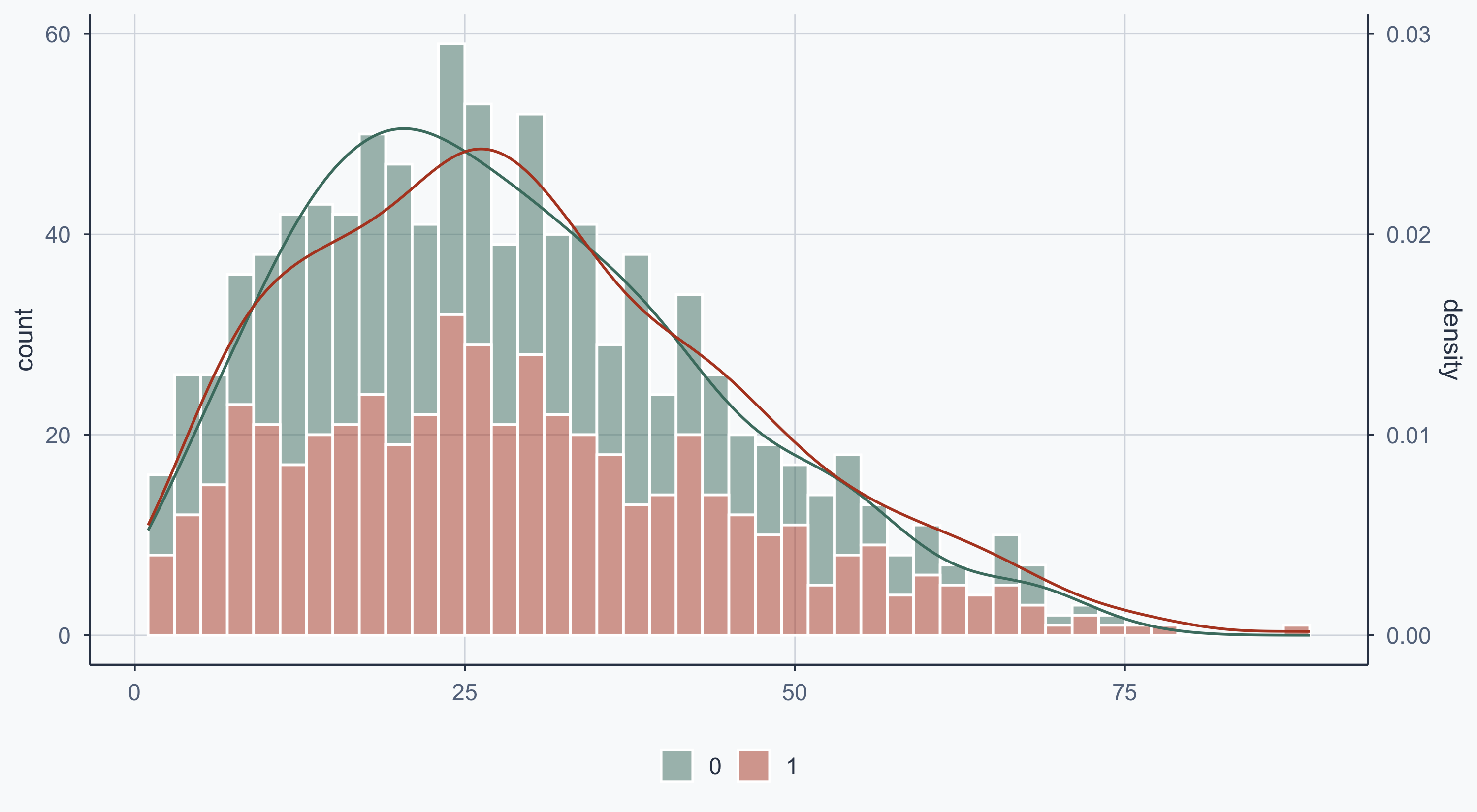
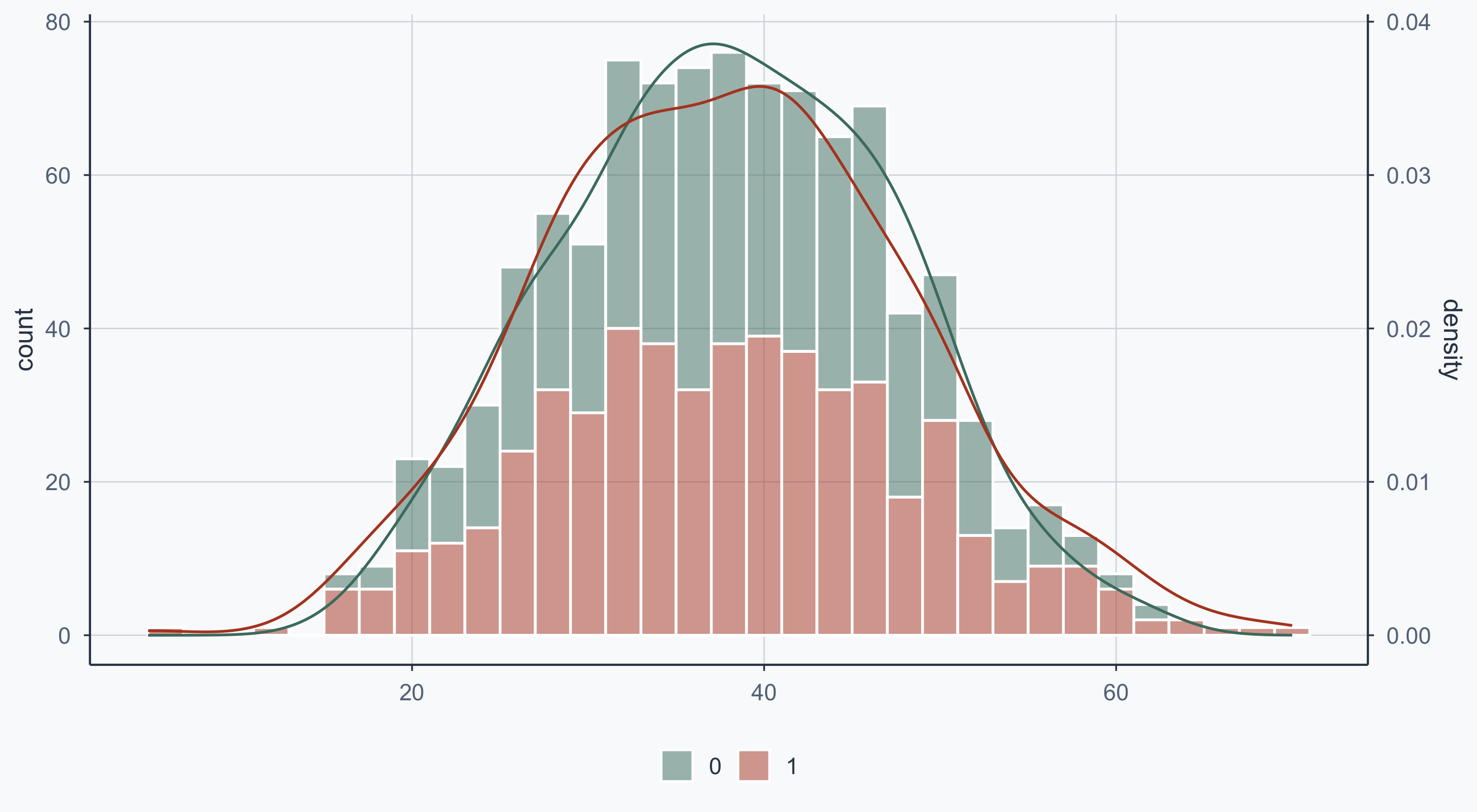
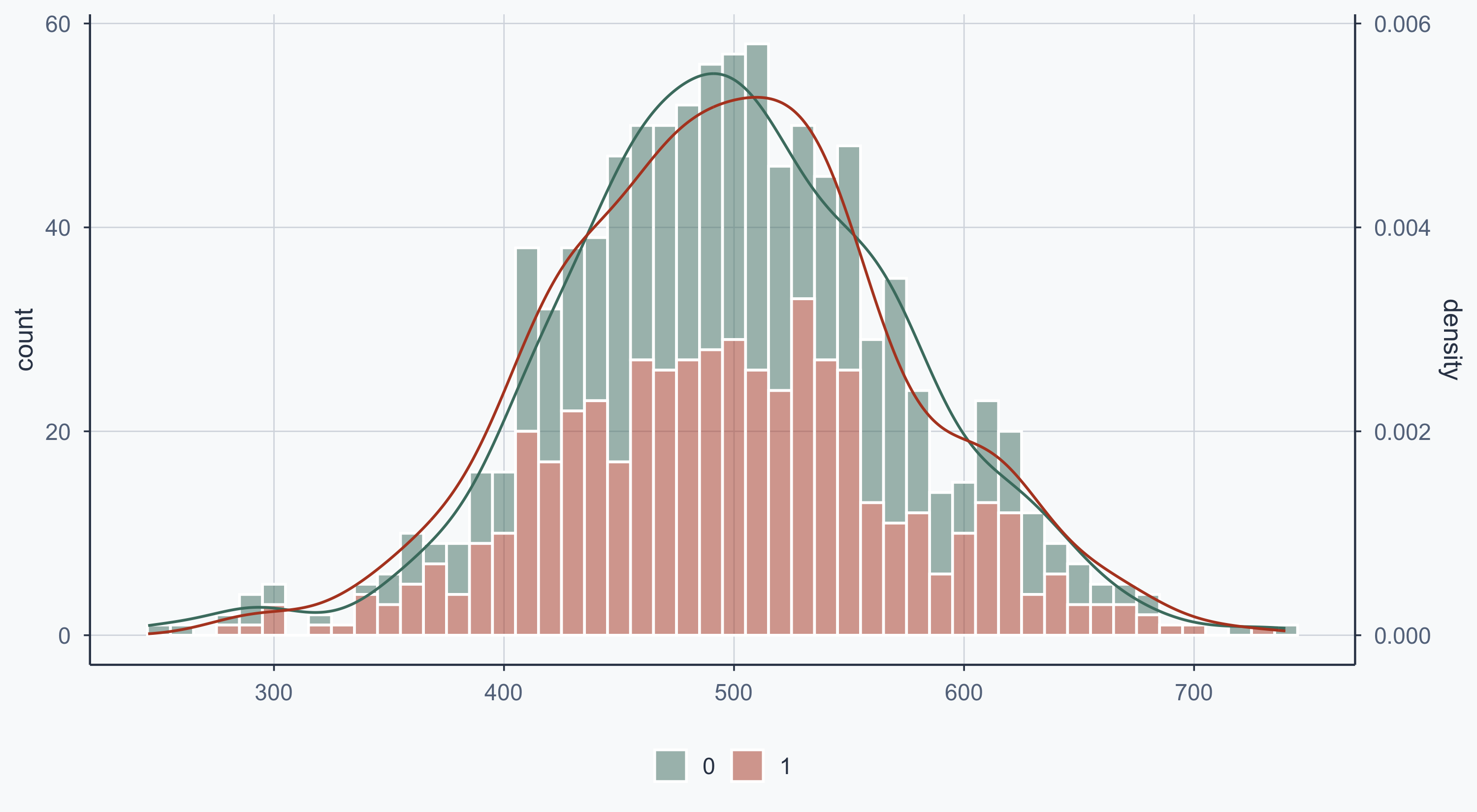
Income and malaria risk appear normally distributed. Net is binary (as expected). Age and health are left-skewed.

Checking Balance

Was Randomization Balanced?

First: was assignment roughly 50/50?

people_randomized <- rct_data %>%
  count(net) %>%
  mutate(prop = n / sum(n))
people_randomized
  net   n  prop
1   0 478 0.478
2   1 522 0.522

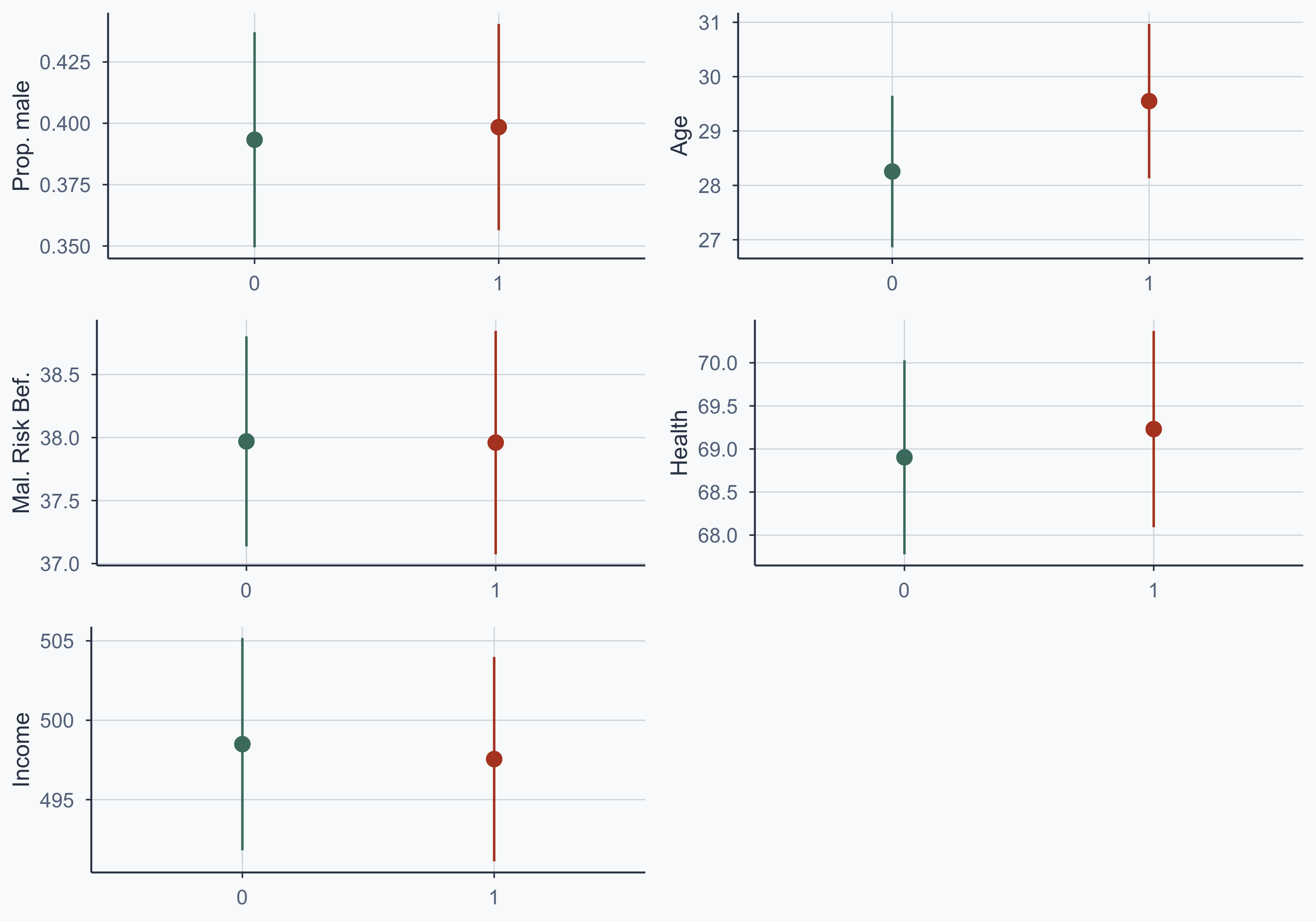
Pre-Treatment Characteristics

Are the treatment and control groups similar on observable characteristics?

rct_data$sex_num <- as.numeric(as.factor(as.character(rct_data$sex)))
rct_data$sex_num[rct_data$sex_num == 2] <- 0

people_randomized <- rct_data %>%
  group_by(net) %>%
  summarize(
    prop_male = mean(sex_num),
    avg_age = mean(age),
    avg_malaria_risk_pre = mean(malaria_risk_pre),
    avg_health = mean(health),
    avg_income = mean(income)
  )
people_randomized
# A tibble: 2 × 6
    net prop_male avg_age avg_malaria_risk_pre avg_health avg_income
  <int>     <dbl>   <dbl>                <dbl>      <dbl>      <dbl>
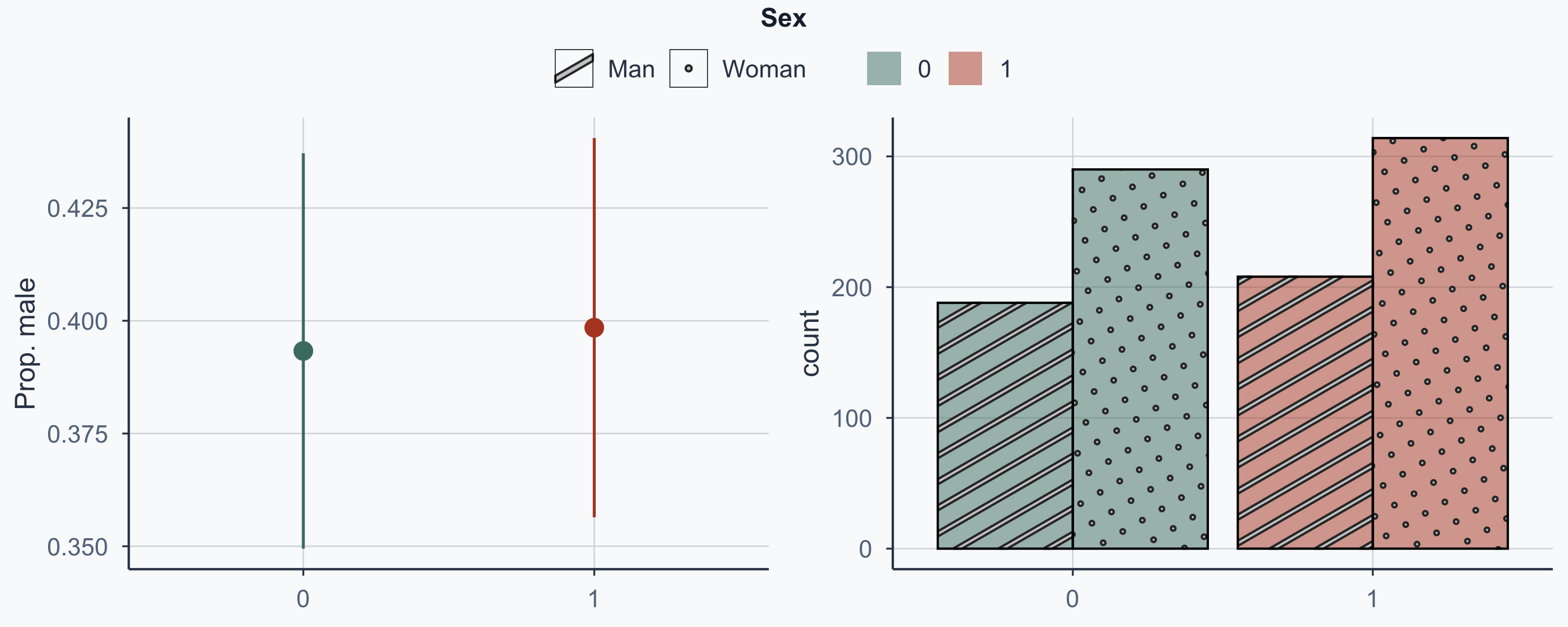
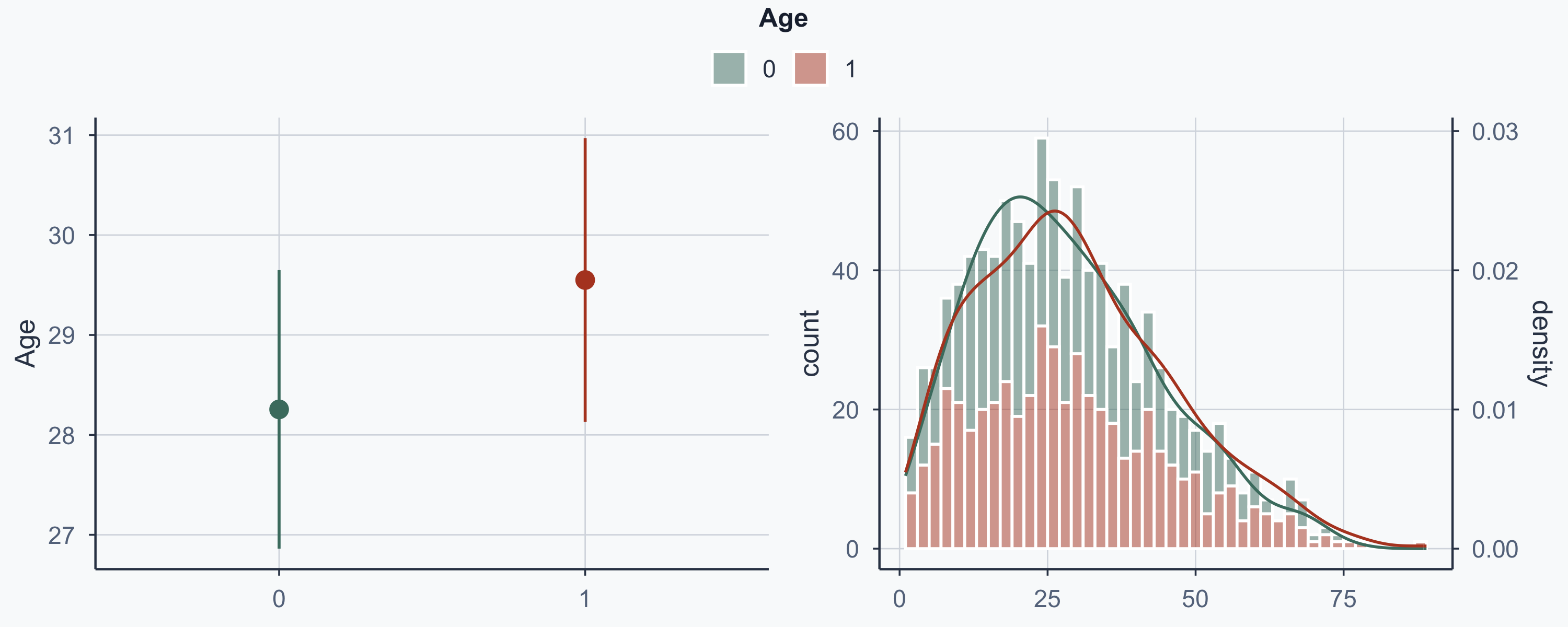
1     0     0.393    28.3                 38.0       68.9       498.
2     1     0.398    29.5                 38.0       69.2       498.

T-Tests for Balance

We can formally test whether differences are statistically significant:

# Method 1: subset and compare
rct_data1 <- subset(rct_data, net == 1)
rct_data0 <- subset(rct_data, net == 0)
t.test(rct_data0$sex_num, rct_data1$sex_num, alternative = "two.sided")

    Welch Two Sample t-test

data:  rct_data0$sex_num and rct_data1$sex_num
t = -0.16658, df = 990.67, p-value = 0.8677
alternative hypothesis: true difference in means is not equal to 0
95 percent confidence interval:
 -0.06597315  0.05564916
sample estimates:
mean of x mean of y 
0.3933054 0.3984674 

Formula Syntax for T-Tests

A more concise way — using formula notation:

# Method 2: formula syntax
t.test(sex_num ~ net, data = rct_data, alternative = "two.sided")

    Welch Two Sample t-test

data:  sex_num by net
t = -0.16658, df = 990.67, p-value = 0.8677
alternative hypothesis: true difference in means between group 0 and group 1 is not equal to 0
95 percent confidence interval:
 -0.06597315  0.05564916
sample estimates:
mean in group 0 mean in group 1 
      0.3933054       0.3984674 

\(p = 0.87 > 0.05\) → we do not reject \(H_0\). No evidence that gender differs between groups.

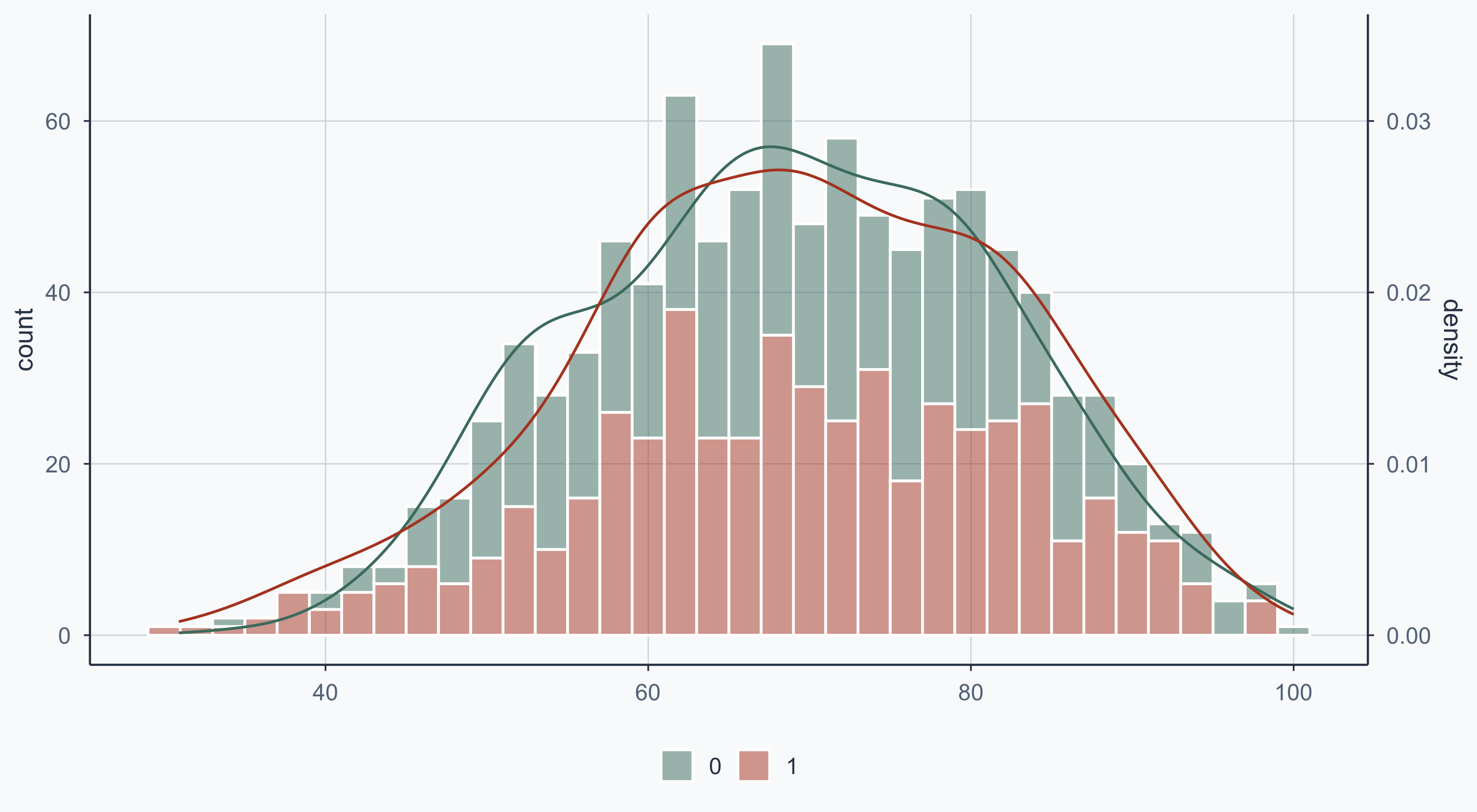
Balance T-Tests: Sex, Age, Pre-Malaria Risk

t.test(sex_num ~ net, data = rct_data, alternative = "two.sided")["p.value"]
$p.value
[1] 0.8677374
t.test(age ~ net, data = rct_data, alternative = "two.sided")["p.value"]
$p.value
[1] 0.2026112
t.test(malaria_risk_pre ~ net, data = rct_data, alternative = "two.sided")["p.value"]
$p.value
[1] 0.9873827

Balance T-Tests: Health, Income

t.test(health ~ net, data = rct_data, alternative = "two.sided")["p.value"]
$p.value
[1] 0.6882691
t.test(income ~ net, data = rct_data, alternative = "two.sided")["p.value"]
$p.value
[1] 0.8424983

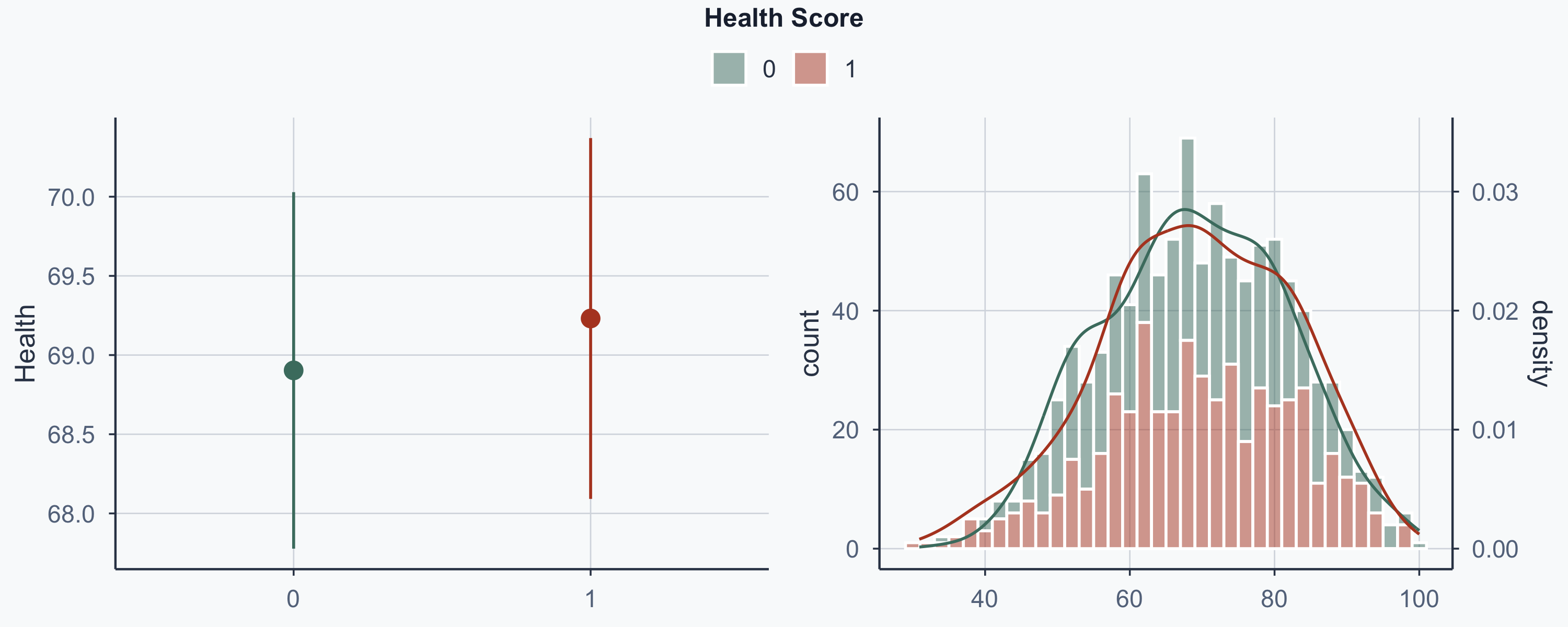
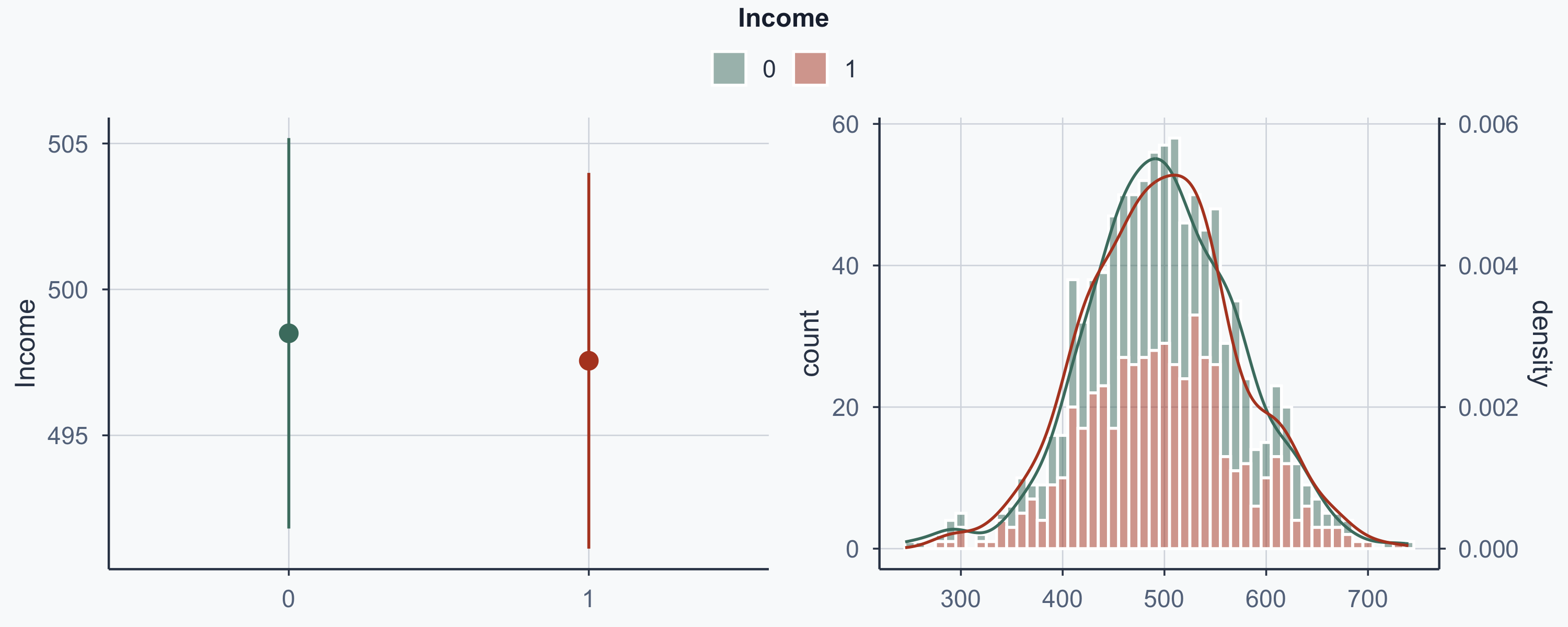
All \(p > 0.05\) — the groups are well balanced. Randomization worked.

A Caution: Multiple Comparisons

We ran 5 t-tests. At \(\alpha = 0.05\), the probability of at least one false positive is:

\[P(\text{at least 1 false positive}) = 1 - (1-0.05)^5 \approx 0.23\]

That’s a 23% chance of declaring imbalance when none exists. With more variables, this gets worse. Solutions include Bonferroni correction (divide \(\alpha\) by the number of tests) or reporting all p-values and letting readers judge the overall pattern — which is what we do here.

Plotting Differences

Point Range Plots

Show code
rct_data$treat <- as.factor(rct_data$net)

plot_diff_sex <- ggplot(rct_data, aes(x = treat, y = sex_num, color = treat)) +
  stat_summary(geom = "pointrange", fun.data = "mean_se",
               fun.args = list(mult = 1.96)) +
  scale_color_manual(values = c(sage, terracotta)) +
  guides(color = "none") +
  labs(x = NULL, y = "Prop. male") +
  theme_meridian()
plot_diff_age <- ggplot(rct_data, aes(x = treat, y = age, color = treat)) +
  stat_summary(geom = "pointrange", fun.data = "mean_se",
               fun.args = list(mult = 1.96)) +
  scale_color_manual(values = c(sage, terracotta)) +
  guides(color = "none") +
  labs(x = NULL, y = "Age") +
  theme_meridian()
plot_diff_malaria <- ggplot(rct_data, aes(x = treat, y = malaria_risk_pre, color = treat)) +
  stat_summary(geom = "pointrange", fun.data = "mean_se",
               fun.args = list(mult = 1.96)) +
  scale_color_manual(values = c(sage, terracotta)) +
  guides(color = "none") +
  labs(x = NULL, y = "Mal. Risk Bef.") +
  theme_meridian()
plot_diff_health <- ggplot(rct_data, aes(x = treat, y = health, color = treat)) +
  stat_summary(geom = "pointrange", fun.data = "mean_se",
               fun.args = list(mult = 1.96)) +
  scale_color_manual(values = c(sage, terracotta)) +
  guides(color = "none") +
  labs(x = NULL, y = "Health") +
  theme_meridian()
plot_diff_income <- ggplot(rct_data, aes(x = treat, y = income, color = treat)) +
  stat_summary(geom = "pointrange", fun.data = "mean_se",
               fun.args = list(mult = 1.96)) +
  scale_color_manual(values = c(sage, terracotta)) +
  guides(color = "none") +
  labs(x = NULL, y = "Income") +
  theme_meridian()
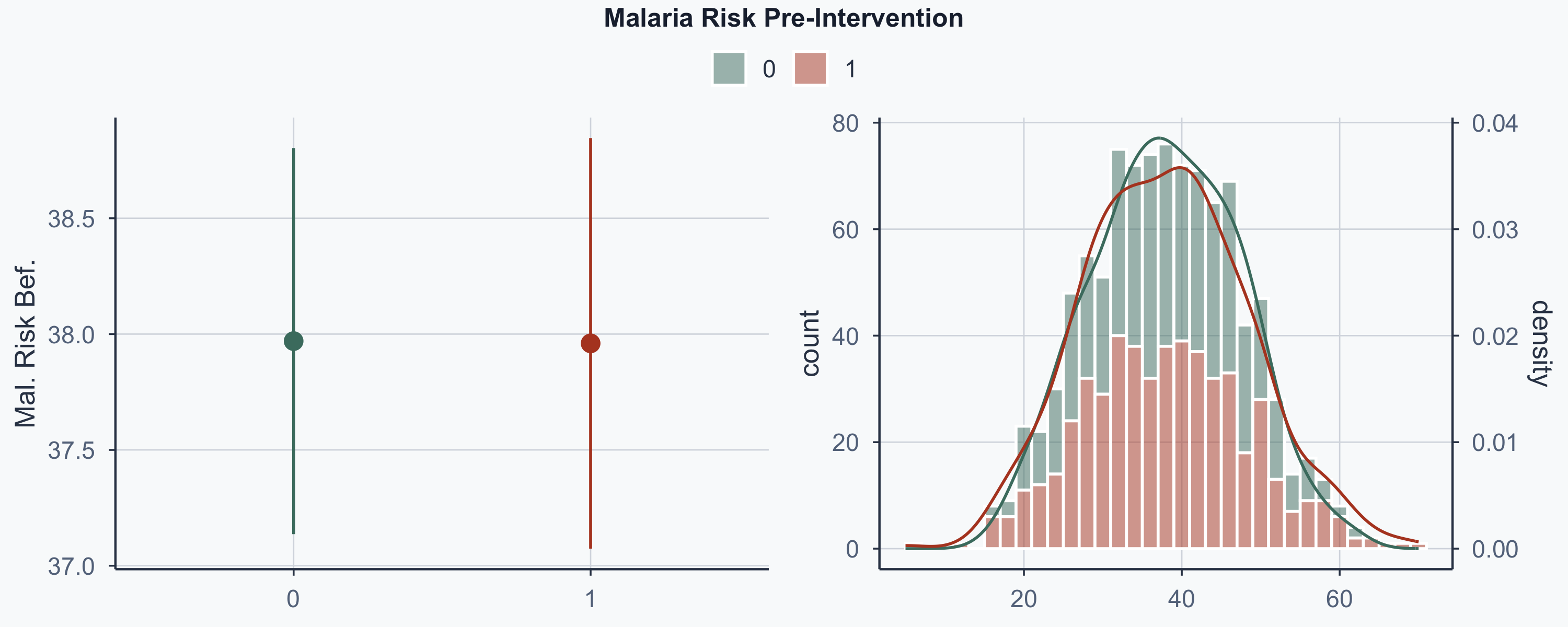
ggarrange(plot_diff_sex, plot_diff_age, plot_diff_malaria,
          plot_diff_health, plot_diff_income,
          ncol = 2, nrow = 3, common.legend = TRUE)

Distribution: Sex by Group

Show code
ggplot(rct_data, aes(pattern = sex, x = treat)) +
  geom_bar(
    position = "dodge", aes(fill = treat),
    alpha = 0.5
  ) +
  geom_bar_pattern(
    position = "dodge", aes(pattern = sex),
    fill = NA, linewidth = 0.5, color = "black"
  ) +
  scale_pattern_manual(
    name = NULL,
    values = c(Man = "stripe", Woman = "circle")
  ) +
  scale_fill_manual(values = c(sage, terracotta)) +
  labs(fill = NULL) +
  xlab(NULL) +
  theme_meridian()
Histogram, Density, or Both?

  • A histogram shows frequencies (how many times we see each value)
  • A density plot shows the probability density function (smooth continuous line)
  • We can overlay both for comparison

Histogram: Age by Group

Show code
ggplot(rct_data, aes(x = age, fill = treat, group = treat)) +
  guides(color = "none") +
  geom_histogram(binwidth = 2, color = "white", alpha = 0.5) +
  scale_fill_manual(values = c(sage, terracotta)) +
  labs(fill = NULL) +
  xlab(NULL) +
  theme_meridian()
Density: Age by Group

Show code
ggplot(rct_data, aes(x = age, fill = treat, group = treat)) +
  guides(color = "none") +
  geom_density(aes(y = after_stat(density), color = treat), fill = NA) +
  scale_color_manual(values = c(sage, terracotta)) +
  labs(fill = NULL) +
  xlab(NULL) +
  theme_meridian()
Combined: Age by Group

Note the multiplicative factor of 2000 in geom_density to have comparable scales on the two y-axes.

Show code
ggplot(rct_data, aes(x = age, fill = treat, group = treat)) +
  guides(color = "none") +
  geom_histogram(binwidth = 2, color = "white", alpha = 0.5) +
  geom_density(
    aes(y = after_stat(density) * 2000, color = treat),
    fill = NA
  ) +
  scale_fill_manual(values = c(sage, terracotta)) +
  scale_color_manual(values = c(sage, terracotta)) +
  scale_y_continuous(
    name = "count",
    sec.axis = sec_axis(~ .x / 2000, name = "density")
  ) +
  labs(fill = NULL) +
  xlab(NULL) +
  theme_meridian()
Distribution: Pre-Malaria Risk

Show code
ggplot(rct_data, aes(x = malaria_risk_pre, fill = treat, group = treat)) +
  guides(color = "none") +
  geom_histogram(binwidth = 2, color = "white", alpha = 0.5) +
  geom_density(
    aes(y = after_stat(density) * 2000, color = treat),
    fill = NA
  ) +
  scale_fill_manual(values = c(sage, terracotta)) +
  scale_color_manual(values = c(sage, terracotta)) +
  scale_y_continuous(
    name = "count",
    sec.axis = sec_axis(~ .x / 2000, name = "density")
  ) +
  labs(fill = NULL) +
  xlab(NULL) +
  theme_meridian()
Distribution: Health Score

Show code
ggplot(rct_data, aes(x = health, fill = treat, group = treat)) +
  guides(color = "none") +
  geom_histogram(binwidth = 2, color = "white", alpha = 0.5) +
  geom_density(
    aes(y = after_stat(density) * 2000, color = treat),
    fill = NA
  ) +
  scale_fill_manual(values = c(sage, terracotta)) +
  scale_color_manual(values = c(sage, terracotta)) +
  scale_y_continuous(
    name = "count",
    sec.axis = sec_axis(~ .x / 2000, name = "density")
  ) +
  labs(fill = NULL) +
  xlab(NULL) +
  theme_meridian()
Distribution: Income

Show code
ggplot(rct_data, aes(x = income, fill = treat, group = treat)) +
  guides(color = "none") +
  geom_histogram(binwidth = 10, color = "white", alpha = 0.5) +
  geom_density(
    aes(y = after_stat(density) * 10000, color = treat),
    fill = NA
  ) +
  scale_fill_manual(values = c(sage, terracotta)) +
  scale_color_manual(values = c(sage, terracotta)) +
  scale_y_continuous(
    name = "count",
    sec.axis = sec_axis(~ .x / 10000, name = "density")
  ) +
  labs(fill = NULL) +
  xlab(NULL) +
  theme_meridian()
Side by Side: Point Range + Distribution

Estimating the Treatment Effect

The Average Treatment Effect (ATE)

We want the causal effect: \(E(\text{Post-Malaria Risk} \mid \text{Net})\)

\[ATE = E(\overline{\text{Post-Malaria Risk}} \mid \text{Net} = 1) - E(\overline{\text{Post-Malaria Risk}} \mid \text{Net} = 0)\]

people_randomized <- rct_data %>%
  group_by(net) %>%
  summarize(avg_malaria_risk_post = mean(malaria_risk_post))
people_randomized
# A tibble: 2 × 2
    net avg_malaria_risk_post
  <int>                 <dbl>
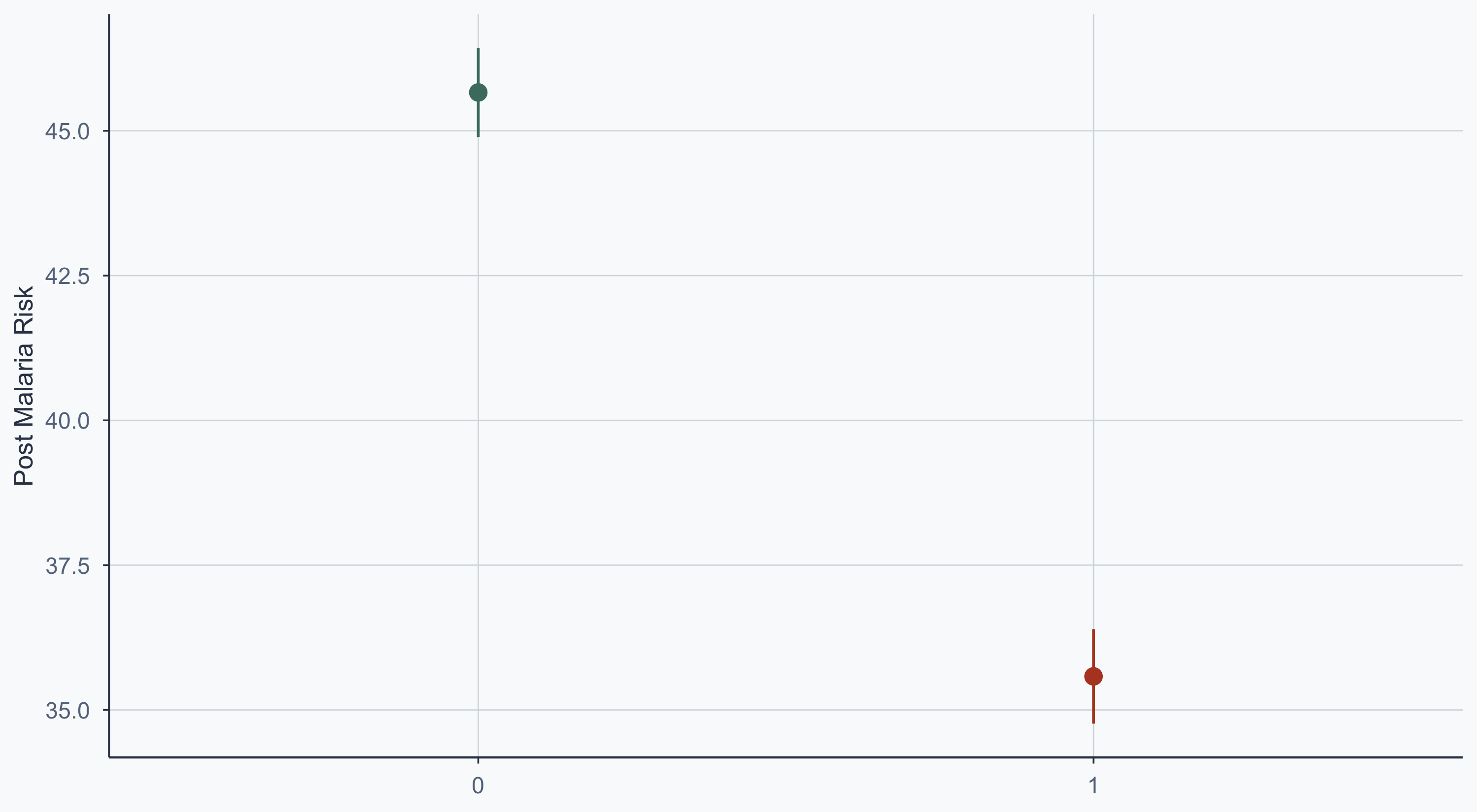
1     0                  45.7
2     1                  35.6

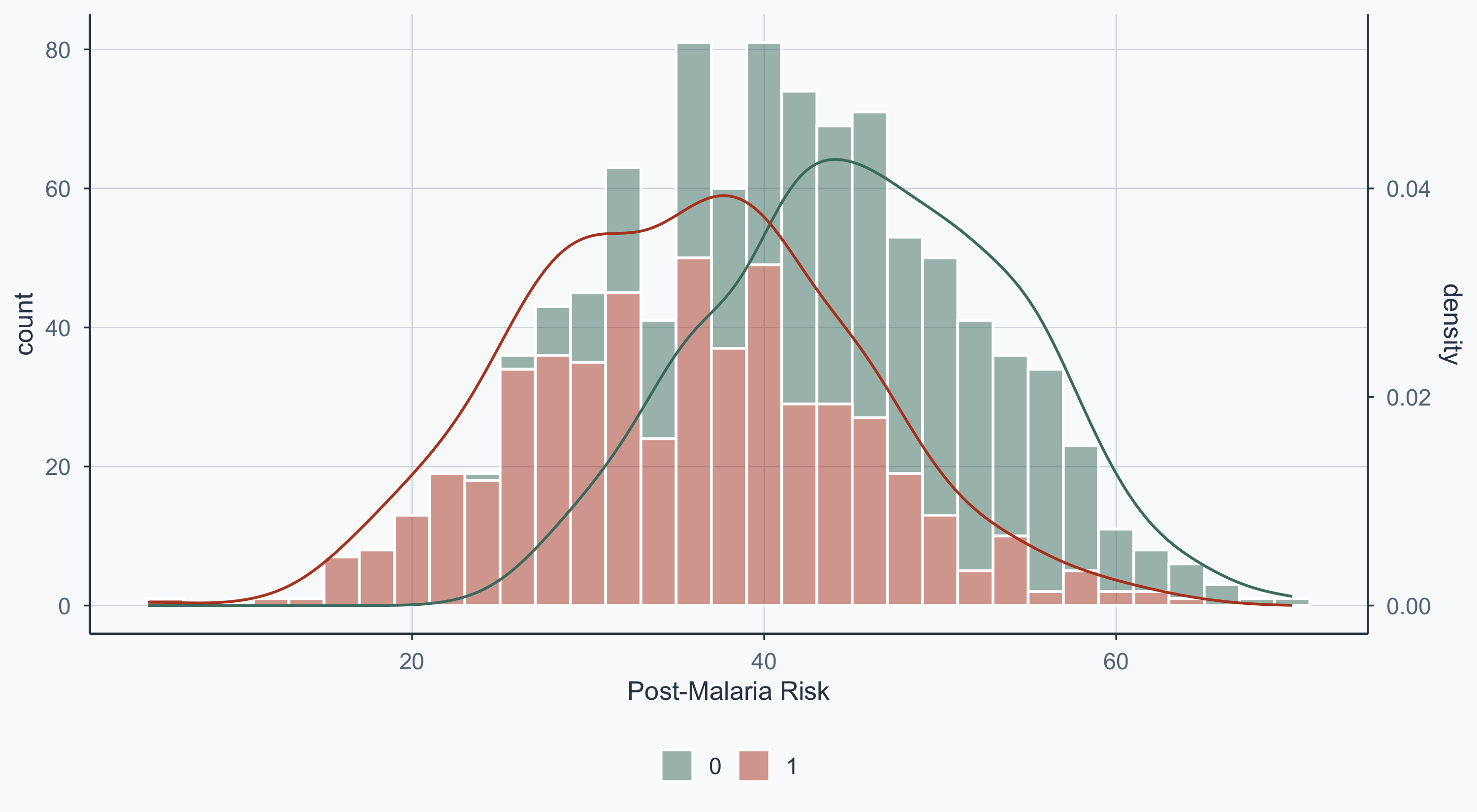
ATE = 35.58 \(-\) 45.66 = -10.08

The program decreased malaria risk by 10.08 units on average.

The Same Result via Regression

model_rct1 <- lm(malaria_risk_post ~ net, data = rct_data)
summary(model_rct1)

Call:
lm(formula = malaria_risk_post ~ net, data = rct_data)

Residuals:
     Min       1Q   Median       3Q      Max 
-30.5794  -6.4719   0.0798   6.1909  28.9747 

Coefficients:
            Estimate Std. Error t value Pr(>|t|)    
(Intercept)  45.6621     0.4146  110.14   <2e-16 ***
net         -10.0827     0.5738  -17.57   <2e-16 ***
---
Signif. codes:  0 '***' 0.001 '**' 0.01 '*' 0.05 '.' 0.1 ' ' 1

Residual standard error: 9.064 on 998 degrees of freedom
Multiple R-squared:  0.2363,    Adjusted R-squared:  0.2355 
F-statistic: 308.7 on 1 and 998 DF,  p-value: < 2.2e-16

Adding Controls

Show code
model_rct1 <- lm(malaria_risk_post ~ net, data = rct_data)
model_rct2 <- lm(malaria_risk_post ~ net + income + age + sex_num, data = rct_data)

models <- list("Risk of Malaria" = model_rct1,
               "Risk of Malaria" = model_rct2)

cm <- c(
  'net' = 'Received Mosquito Net (Treatment)',
  'income' = 'Income',
  'age' = 'Age',
  'sex_num' = 'Sex',
  '(Intercept)' = 'Intercept'
)

modelsummary(models, stars = TRUE, coef_map = cm,
             gof_map = c("nobs", "r.squared"))
Risk of Malaria Risk of Malaria
+ p < 0.1, * p < 0.05, ** p < 0.01, *** p < 0.001
Received Mosquito Net (Treatment) -10.083*** -10.235***
(0.574) (0.527)
Income -0.045***
(0.004)
Age 0.083***
(0.016)
Sex 0.518
(0.539)
Intercept 45.662*** 65.608***
(0.415) (1.866)
Num.Obs. 1000 1000
R2 0.236 0.359

Why the Coefficient Barely Changes

Compare the net coefficient across both models — it’s nearly identical. Why?

In a well-randomized experiment, treatment is uncorrelated with the controls (age, income, sex). Adding uncorrelated variables to a regression doesn’t change the coefficient on treatment — it only absorbs residual variance and tightens the standard errors.

If the coefficient did change substantially, that would be a red flag: it would suggest the controls are correlated with treatment assignment, meaning randomization may have failed.

Rule of thumb: a stable treatment coefficient across specifications is evidence that your experiment is clean.

Post-Treatment Distribution

Show code
ggplot(rct_data, aes(x = malaria_risk_post, fill = treat, group = treat)) +
  guides(color = "none") +
  geom_histogram(binwidth = 2, color = "white", alpha = 0.5) +
  geom_density(
    aes(y = after_stat(density) * 1500, color = treat),
    fill = NA
  ) +
  scale_fill_manual(values = c(sage, terracotta)) +
  scale_color_manual(values = c(sage, terracotta)) +
  scale_y_continuous(
    name = "count",
    sec.axis = sec_axis(~ .x / 1500, name = "density")
  ) +
  labs(fill = NULL, x = "Post-Malaria Risk") +
  theme_meridian()

Treatment Effect: Point Range

Show code
ggplot(rct_data, aes(x = treat, y = malaria_risk_post, color = treat)) +
  stat_summary(geom = "pointrange", fun.data = "mean_se",
               fun.args = list(mult = 1.96)) +
  scale_color_manual(values = c(sage, terracotta)) +
  guides(color = "none") +
  labs(x = NULL, y = "Post Malaria Risk") +
  theme_meridian()

Mapping the Data

Why Map an RCT?

Mapping isn’t just decoration — it serves several analytical purposes:

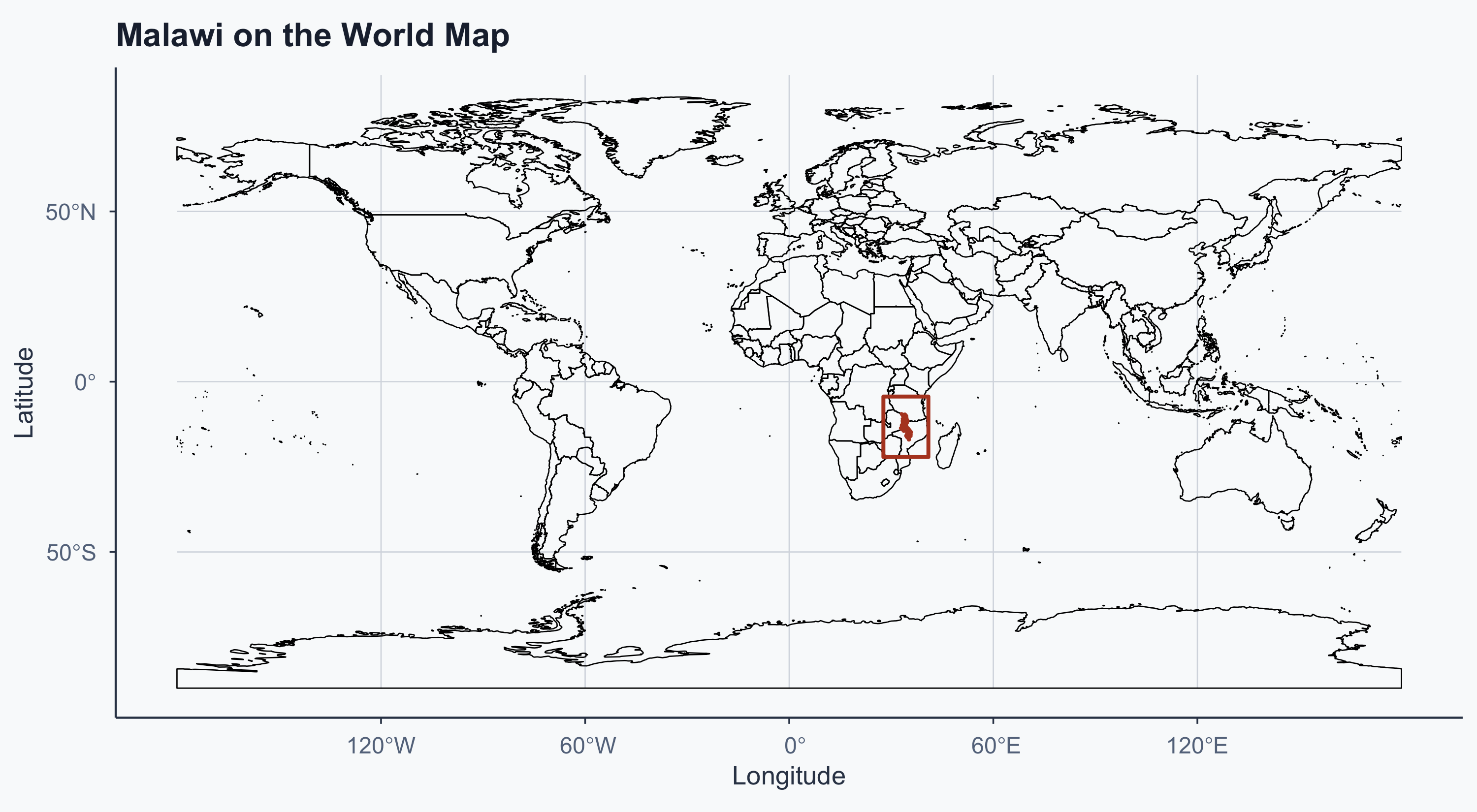
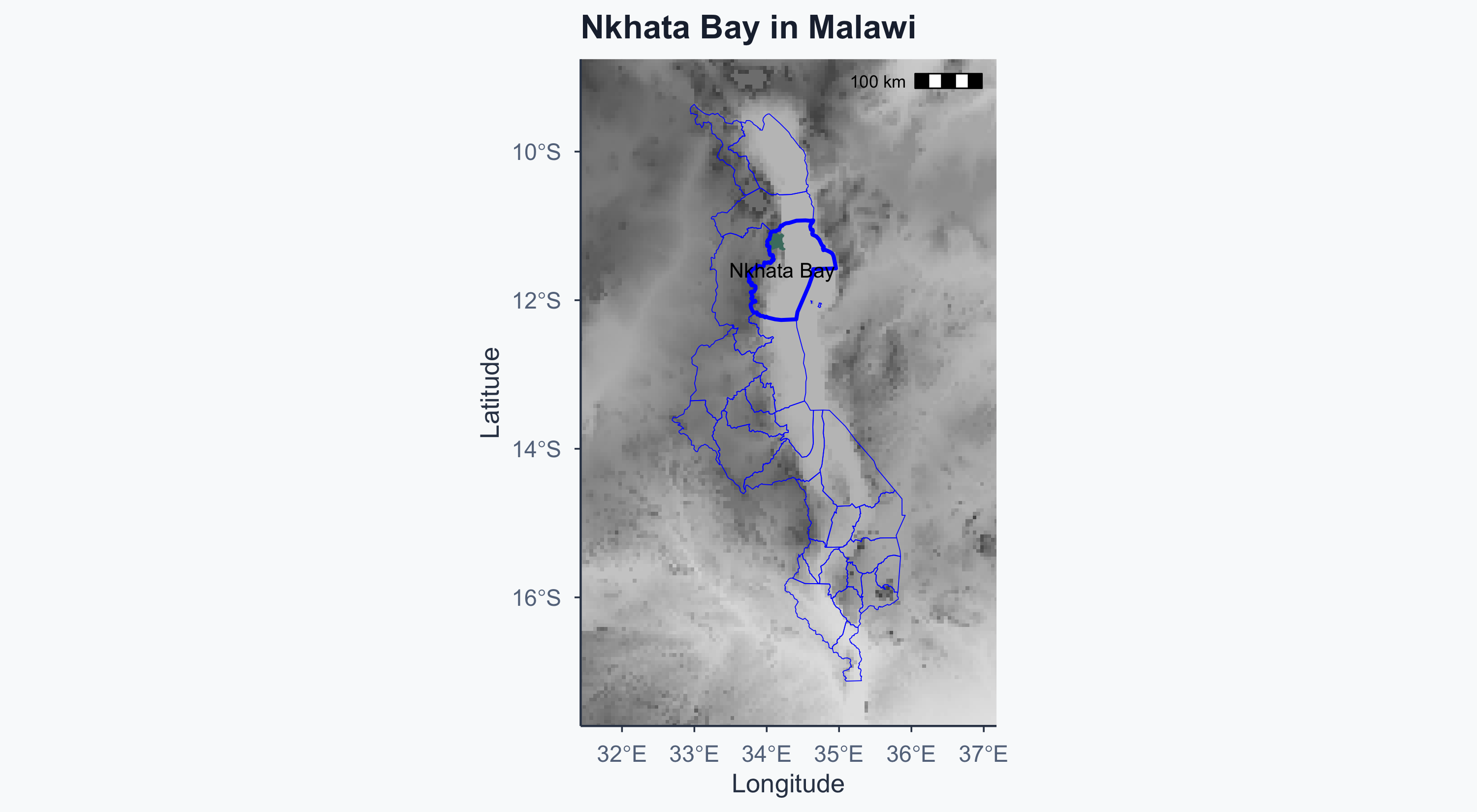
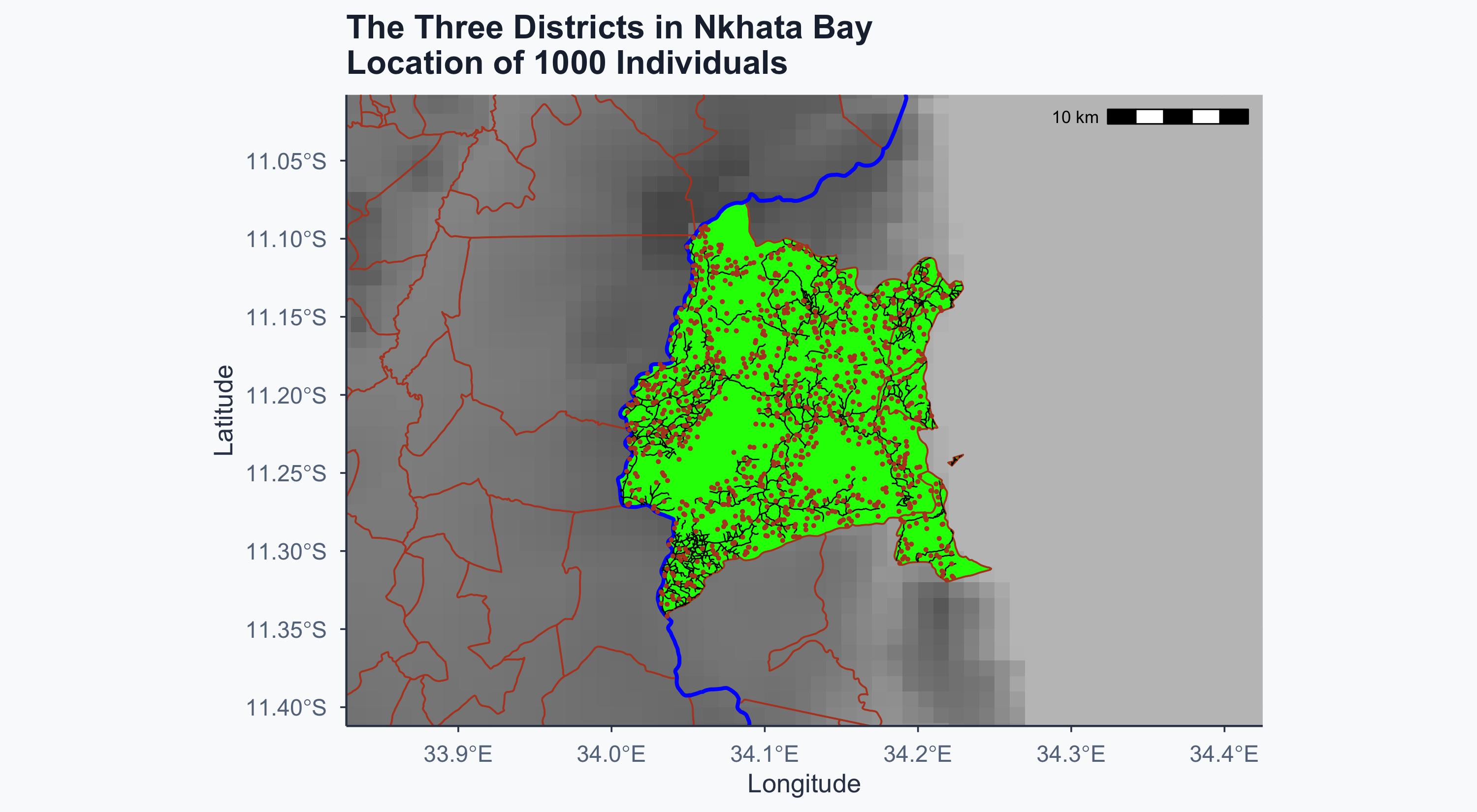
  • Context: are the three districts geographically clustered? If so, results may not generalize to distant regions with different ecology
  • Spatial spillovers: are treatment and control individuals close enough that nets in one household could protect neighbors? This would attenuate the treatment effect
  • External validity: the elevation, proximity to the lake, and road access all affect malaria exposure — mapping helps us understand where these results apply

Loading Shapefiles

mwi <- st_read("./data/malawi-latest-free/gadm41_MWI_0.shp", quiet = TRUE)
mwi1 <- st_read("./data/malawi-latest-free/gadm41_MWI_1.shp", quiet = TRUE)
mwi3 <- st_read("./data/malawi-latest-free/gadm41_MWI_3.shp", quiet = TRUE)
select_comm <- st_read("./data/malawi-latest-free/selected_communes3.shp", quiet = TRUE)
elev <- read_stars("./data/elev.tif")
world <- ne_countries(scale = "medium", returnclass = "sf")

Download links:

Simplifying Polygons

sf::sf_use_s2(FALSE)
mwi <- st_simplify(mwi, dTolerance = 0.005)
mwi1 <- st_simplify(mwi1, dTolerance = 0.005)
mwi3 <- st_simplify(mwi3, dTolerance = 0.005)
select_comm <- st_simplify(select_comm, dTolerance = 0.0005)
world <- st_simplify(world, dTolerance = 0.005)

Zoom Level for Malawi

mwi_extent <- st_bbox(mwi)
min_lon_x <- mwi_extent["xmin"]
max_lon_x <- mwi_extent["xmax"]
min_lat_y <- mwi_extent["ymin"]
max_lat_y <- mwi_extent["ymax"]

error <- 5
sp_df <- data.frame(
  lon = c(min_lon_x - error, max_lon_x + error,
          min_lon_x - error, max_lon_x + error),
  lat = c(min_lat_y - error, min_lat_y - error,
          max_lat_y + error, max_lat_y + error)
)

poly <- sp_df %>%
  st_as_sf(coords = c("lon", "lat"), crs = st_crs(mwi)) %>%
  st_bbox() %>%
  st_as_sfc()

Cropping the Elevation Raster

elev2 <- st_warp(elev, st_as_stars(st_bbox(elev), dx = 0.05, dy = 0.05))
elev2[elev2 > 2000] <- NA
dem_mwi <- st_crop(elev2, poly)

Malawi on the World Map

Show code
ggplot() +
  geom_sf(data = world, fill = NA, color = "black", linewidth = 0.3) +
  geom_sf(data = mwi, fill = terracotta, color = terracotta, linewidth = 0.7) +
  geom_sf(data = poly, fill = NA, color = terracotta, linewidth = 0.9) +
  labs(x = "Longitude", y = "Latitude", title = "Malawi on the World Map") +
  theme_meridian()

Nkhata Bay in Malawi

Show code
mwi1_lab <- subset(mwi1, NAME_1 == "Nkhata Bay")
grey_palette <- colorRampPalette(c("grey90", "grey30"))
num_breaks <- 10
grey_colors <- grey_palette(num_breaks)

error <- 0.2
ggplot() +
  geom_stars(data = elev2, show.legend = FALSE) +
  scale_fill_gradientn(colours = grey_colors) +
  geom_sf(data = select_comm, fill = sage, color = sage, linewidth = 0.4) +
  geom_sf(data = mwi1, fill = NA, color = "blue", linewidth = 0.2) +
  geom_sf(data = mwi1_lab, fill = NA, color = "blue", linewidth = 0.9) +
  geom_sf_text(data = mwi1_lab, aes(label = NAME_1), size = 3.5) +
  labs(x = "Longitude", y = "Latitude", title = "Nkhata Bay in Malawi") +
  coord_sf(
    xlim = c(min_lon_x - 5 * error, max_lon_x + 5 * error),
    ylim = c(min_lat_y - error, max_lat_y + error)
  ) +
  ggspatial::annotation_scale(location = 'tr') +
  theme_meridian()

Zooming In: The Three Districts

mwi_extent2 <- st_bbox(select_comm)
min_lon_x <- mwi_extent2["xmin"]
max_lon_x <- mwi_extent2["xmax"]
min_lat_y <- mwi_extent2["ymin"]
max_lat_y <- mwi_extent2["ymax"]

mwi <- st_read("./data/malawi-latest-free/gadm41_MWI_0.shp", quiet = TRUE)
mwi1 <- st_read("./data/malawi-latest-free/gadm41_MWI_1.shp", quiet = TRUE)
mwi3 <- st_read("./data/malawi-latest-free/gadm41_MWI_3.shp", quiet = TRUE)
select_comm <- st_read("./data/malawi-latest-free/selected_communes3.shp", quiet = TRUE)
dem <- read_stars("./data/elev.tif")

elev2 <- st_warp(dem, st_as_stars(st_bbox(elev), dx = 0.01, dy = 0.01))
elev2[elev2 > 2000] <- NA

error <- 0.5
sp_df <- data.frame(
  lon = c(min_lon_x - error, max_lon_x + error,
          min_lon_x - error, max_lon_x + error),
  lat = c(min_lat_y - error, min_lat_y - error,
          max_lat_y + error, max_lat_y + error)
)

poly <- sp_df %>%
  st_as_sf(coords = c("lon", "lat"), crs = st_crs(mwi)) %>%
  st_bbox() %>%
  st_as_sfc()

dem_mwi <- st_crop(elev2, poly)

sf::sf_use_s2(FALSE)

Loading Roads

roads <- st_read("./data/malawi-latest-free/gis_osm_roads_free_1_crop2.shp", quiet = TRUE)
roads2 <- st_combine(roads)
roads3 <- st_as_sf(roads2)
roads_crop1 <- sf::st_intersection(roads3, select_comm)

Map: Individuals in the Experiment

Show code
rct_data <- read.csv(file = './data/rct_data_geo_malawi.csv')
mwi1_lab <- subset(mwi1, NAME_1 == "Nkhata Bay")

error <- 0.05
ggplot() +
  geom_stars(data = elev2, show.legend = FALSE) +
  scale_fill_gradientn(colours = grey_colors) +
  geom_sf(data = select_comm, fill = "green", color ="green" , linewidth = 0.4) +
  geom_sf(data = mwi1, fill = NA, color = "blue", linewidth = 0.2) +
  geom_sf(data = mwi3, fill = NA, color = terracotta, linewidth = 0.4) +
  geom_sf(data = mwi1_lab, fill = NA, color = "blue", linewidth = 0.9) +
  geom_sf(data = roads_crop1, fill = NA, color = "black", linewidth = 0.3) +
  geom_point(data = rct_data, aes(x = lon, y = lat),
             color = terracotta, size = 0.3) +
  labs(
    x = "Longitude", y = "Latitude",
    title = "The Three Districts in Nkhata Bay\nLocation of 1000 Individuals"
  ) +
  coord_sf(
    xlim = c(min_lon_x - 3 * error, max_lon_x + 3 * error),
    ylim = c(min_lat_y - error, max_lat_y + error)
  ) +
  ggspatial::annotation_scale(location = 'tr') +
  theme_meridian()

Conclusion

Results

The provision of insecticide-treated nets reduces malaria risk by 10.08 units on average.

If the goal is to reduce malaria in the wider region, scaling up net distribution to all vulnerable populations is supported by this evidence.

Steps in Analyzing an RCT

  1. Check balance — are treatment and control groups comparable on pre-treatment characteristics?
  2. Calculate the difference — compute the ATE (difference in means or via regression)
  3. Show the difference — visualize the treatment effect and distributions